


Video Demo: From Unboxing to Daily Use

The Exhausting Cycle of Dementia Caregiving
You leave sticky notes on the bathroom mirror. You call three times a day to remind Dad about his medications. You text Mom about her doctor’s appointment, and she still asks you four more times when it is. The constant check-ins feel invasive for your loved one and exhausting for you.
Sound familiar?
Caring for someone with dementia creates a challenging communication gap. They need reminders and reassurance, but constant phone calls can feel like nagging—wearing down both of you emotionally. Sticky notes pile up and create confusion. Text messages get forgotten moments after they’re read.
What if there was a gentler way to keep your loved one informed and connected without hovering?
As a Certified Senior Advisor and Senior Home Safety Specialist with over 20 years of experience working with older adults, I’ve seen countless families struggle with this exact dilemma.
That’s why I was excited to evaluate the Memoryboard—a digital display designed specifically to bridge the communication gap in dementia care. My thanks to the team at Memoryboard for providing me a free demo unit so that I could share this with you!
In this review, I’ll share my hands-on experience with the device, explore how it solves real caregiving challenges, and help you determine if it’s the right solution for your family.
What Is the Memoryboard?
The Memoryboard is a digital message and photo display designed specifically for families caring for loved ones with dementia or memory challenges. Think of it as a dedicated communication screen that sits in your loved one’s home, displaying messages, reminders, and photos sent remotely from family members’ smartphones.
Unlike general-purpose tablets or smart displays, the Memoryboard eliminates complexity. There’s no learning curve for the person with dementia—messages simply appear on screen automatically. No buttons to press, no passwords to remember, no apps to navigate either.
Key Features at a Glance:
- Available in two sizes: 10.1-inch and 15.6-inch
- Controlled remotely via smartphone app (iOS and Android)
- One-time purchase—no monthly subscription fees
- Unlimited family members can send messages
- Displays text messages, photos, or combination of both
The device stays plugged in at your loved one’s home while you manage everything from your phone, no matter where you are.
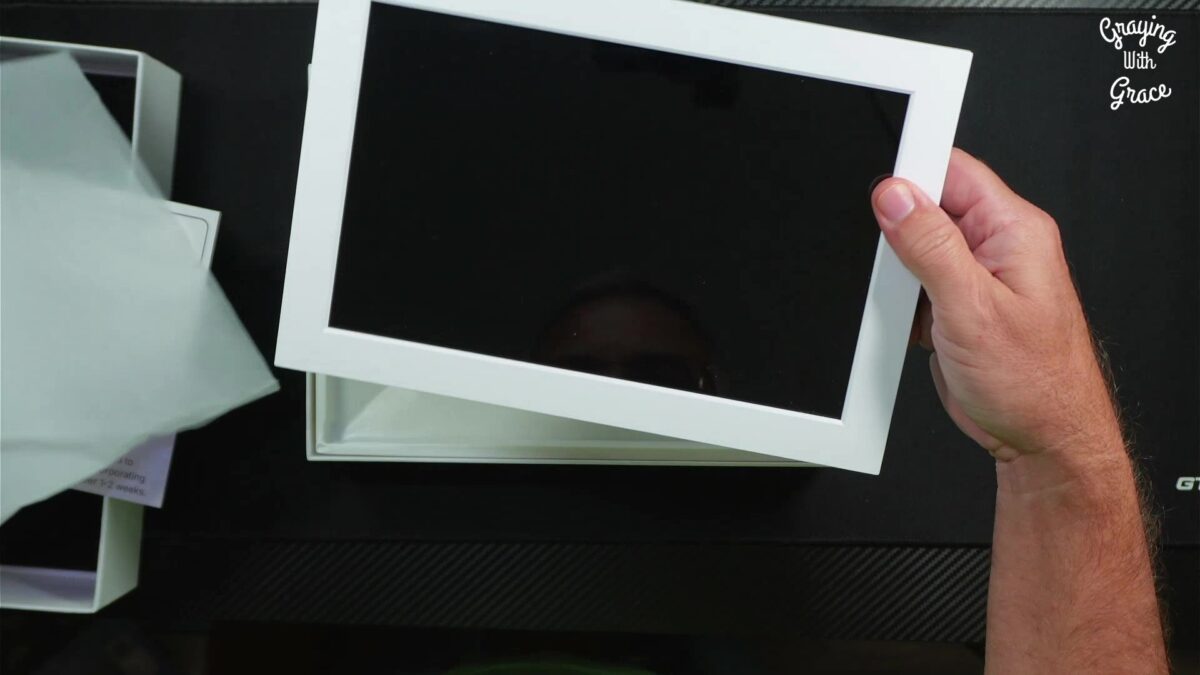
Unboxing and First Impressions
When the Memoryboard arrives, you’ll find everything needed to get started:
- The Memoryboard display
- Tabletop stand attachment (or wall-mounting option)
- Power adapter
- Quick start guide
- Instruction manual
The device itself feels light but also sturdy—you can move it between rooms if needed without worrying about it feeling fragile or flimsy. The matte screen finish is a thoughtful design choice that reduces glare, making it easier on aging eyes.
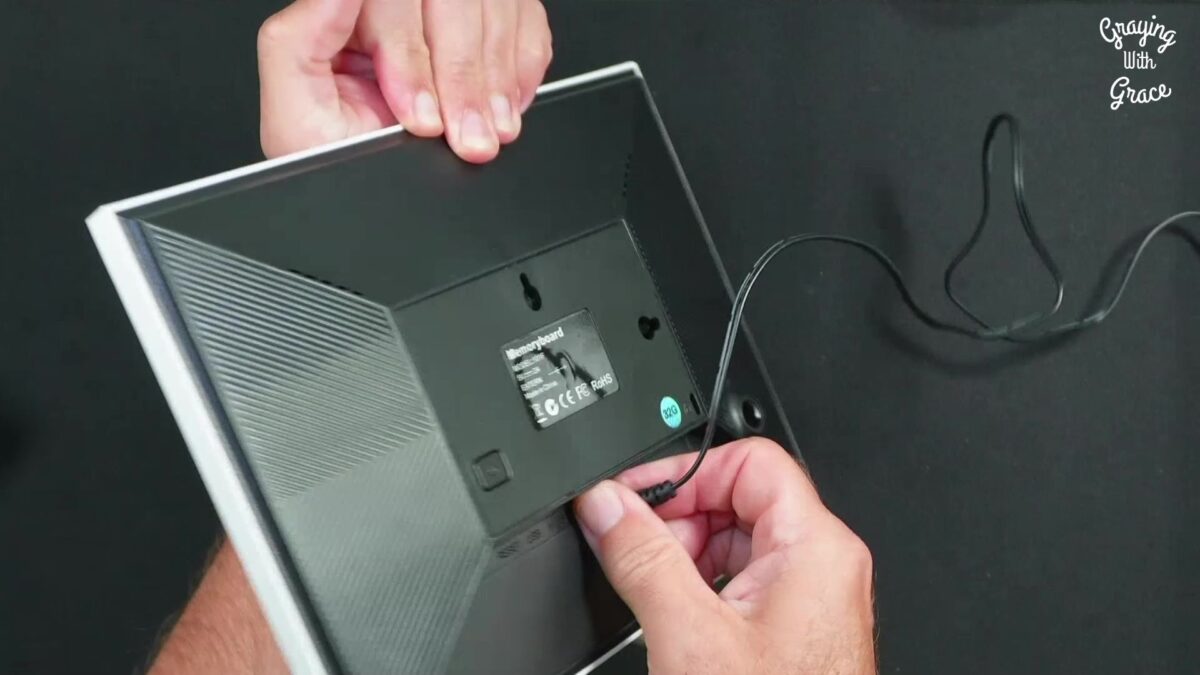
One detail I particularly appreciated: there are no confusing rows of buttons on the front. Just a simple hidden power button on the back. This design choice matters tremendously when your loved one might be tempted to “fix” or adjust a device covered in controls.
How the Memoryboard Could Help Your Family
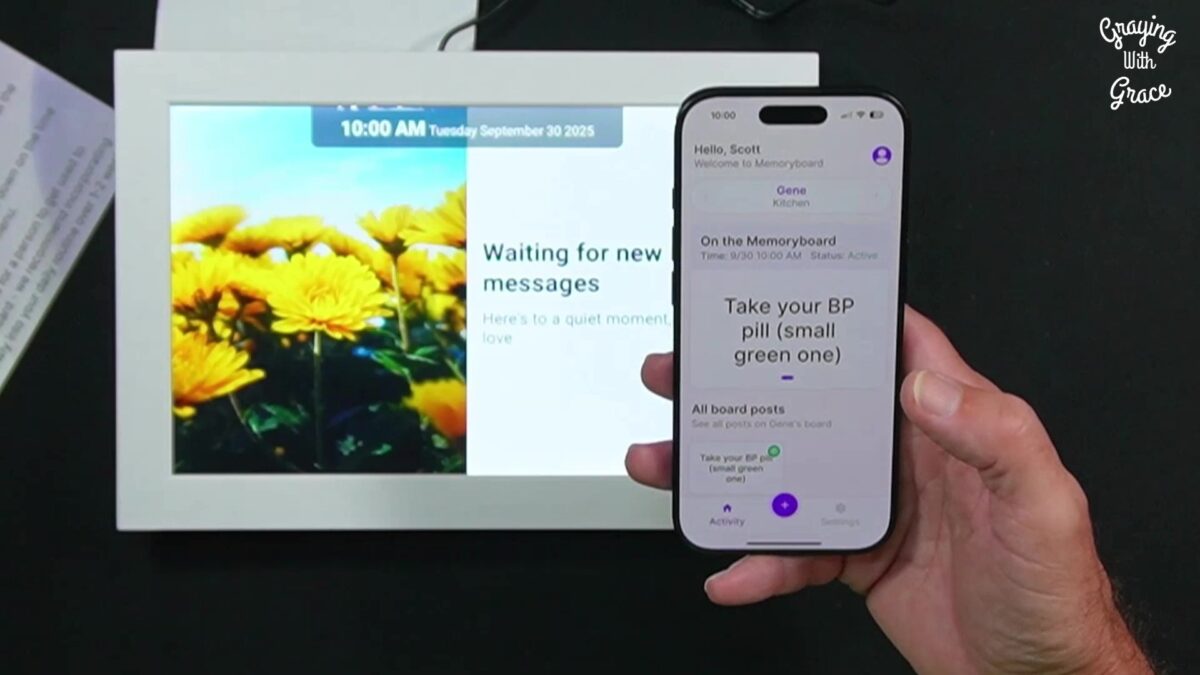
Let me walk you through specific caregiving scenarios where the Memoryboard makes a real difference:
Medication Reminders Without Nagging
Your father forgets his morning blood pressure pill. You’ve been calling him every day at 8 AM to remind him, but the routine frustrates you both. He feels like he’s being treated like a child. You feel guilty for being intrusive.
With the Memoryboard, you schedule a recurring daily message: “Morning meds with breakfast—don’t forget your blue pill.” The reminder appears automatically each morning. Your father sees it when he sits down for breakfast, takes his medication, and feels like he remembered on his own. You both preserve dignity while ensuring safety.
Reducing Appointment Anxiety
Does your mother ask repeatedly about her doctor’s appointment? “When is it? What time are you picking me up?” The repetitive questions stress both of you.
You can send a one-time message the morning of the appointment: “Doctor visit today at 2 PM. I’ll pick you up at 1:30.” The message stays visible all day, giving your mother something to reference whenever anxiety creeps in. The repetitive questions decrease because she has a reliable source of information.
Emotional Connection from a Distance
You live across the country from your aging parent. Phone calls are important, but you worry they feel forgotten between your weekly check-ins.
Each morning at 9 AM, a scheduled message appears on their Memoryboard: “Good morning, Mom—thinking of you today. Love you!” This simple emotional touchpoint takes 10 seconds to schedule but provides days of reassurance. Your mother starts each day knowing she’s loved and remembered.
Photos for Comfort and Orientation
Your grandfather sometimes loses track of what holiday it is or what’s happening today. Written reminders help, but visual cues work even better.
On Thanksgiving morning, family members post a photo of the dinner table being set with the message: “Happy Thanksgiving! Dinner at 5:00 today.” The picture connects him to the event visually. He sees familiar faces, recognizes the setting, and feels anticipation rather than confusion.
Visual Instructions for Daily Tasks
Your grandmother struggles with remembering meals and often skips lunch because she forgets what’s available.
You post a photo of her prepared lunch with text: “Lunch is in the fridge—heat for 2 minutes.” The visual cue (photo of the actual meal) combined with simple instructions increases follow-through dramatically. She can see exactly what you’re referring to, eliminating guesswork.
Keeping Multiple Caregivers Coordinated
Three siblings help care for Dad, but coordination is chaotic. Someone schedules a visit without telling the others. Conflicting information confuses Dad and creates family tension.
With the Memoryboard’s Care Circle feature, all three siblings see the same messages in the app. When one sibling posts “Physical therapist coming Friday at 10,” everyone knows. The Care Circle creates a single source of truth, preventing double-booking and conflicting instructions.
Long-Distance Family Participation
Your sibling provides day-to-day care while you live several states away. You want to help but feel disconnected from the caregiving routine.
Even from across the country, you can post messages, photos, and encouragement throughout the week. Your loved one sees contributions from the whole family, not just the local caregiver. This distributes the emotional labor and helps everyone feel involved.
Getting Started: Setup Process
How long does it take to go from opening the box to sending your first message? In my testing, the entire setup took less than 5 minutes.
Here’s the process:
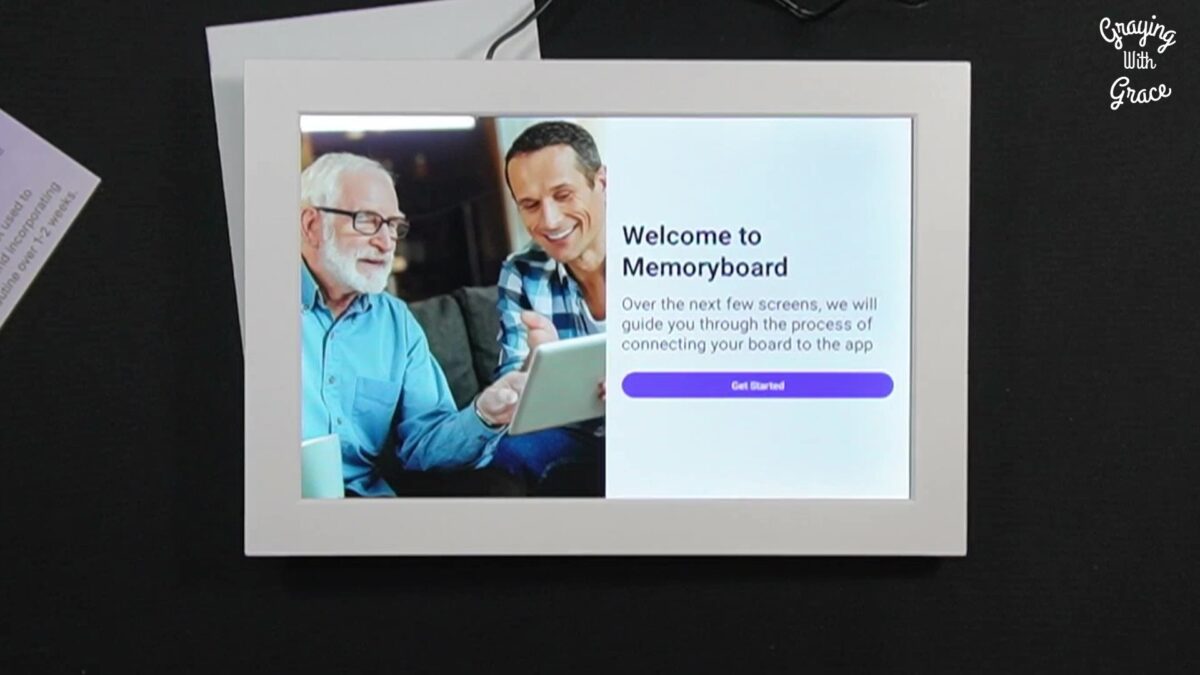
Step 1: Power On and Connect Plug in the Memoryboard and connect it to your Wi-Fi network. The onscreen instructions walk you through each step—no technical expertise required.
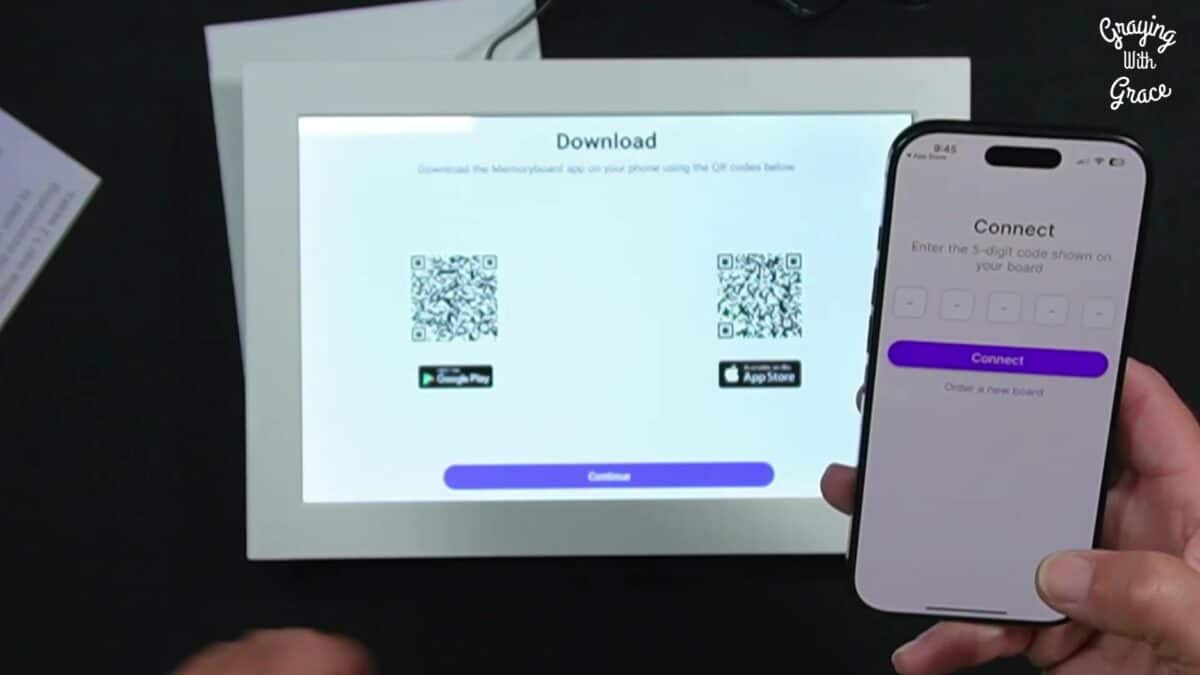
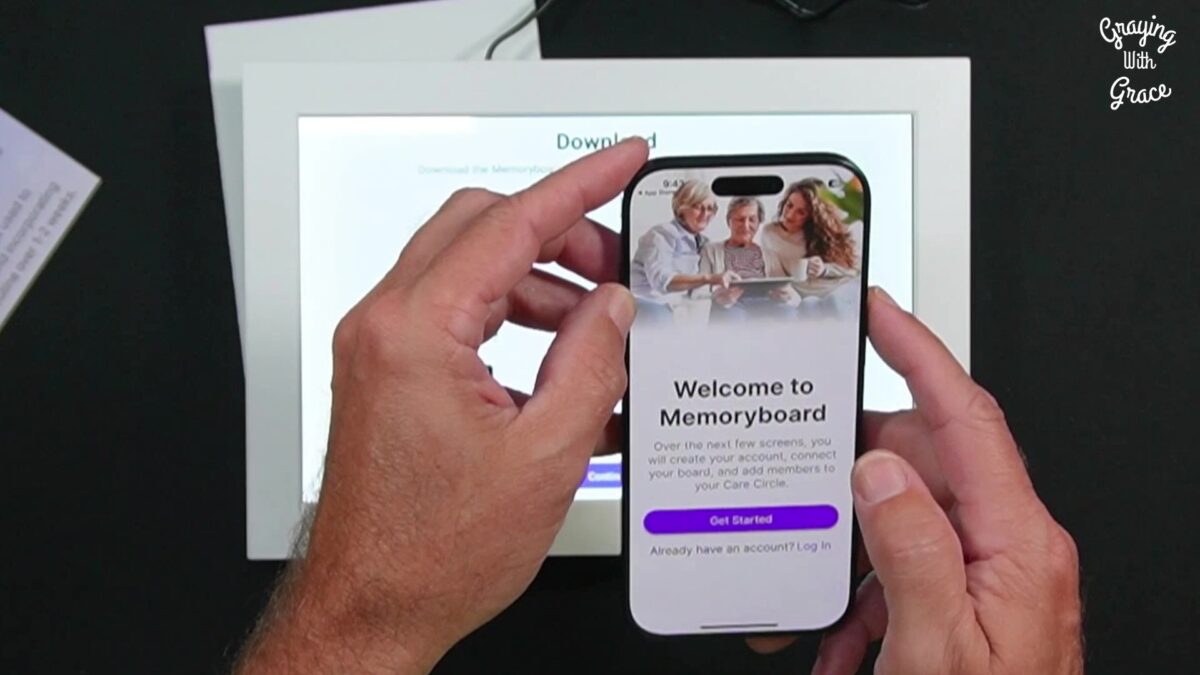
Step 2: Download the App Use the QR code displayed on screen to download the Memoryboard app to your smartphone (available for both iOS and Android).
Step 3: Create Your Account Enter your name, email address, and create a password. Simple and straightforward.
Step 4: Sync the Device Enter the five-digit code displayed on the Memoryboard screen to link it with your app. This pairing takes seconds.
Step 5: Set Up Your Care Circle Identify who will be using the Memoryboard and where it’s located (helpful if you’ll eventually use multiple boards in different rooms). Then invite family members and caregivers to join your Care Circle by entering their email addresses. There’s no limit to how many people you can include.
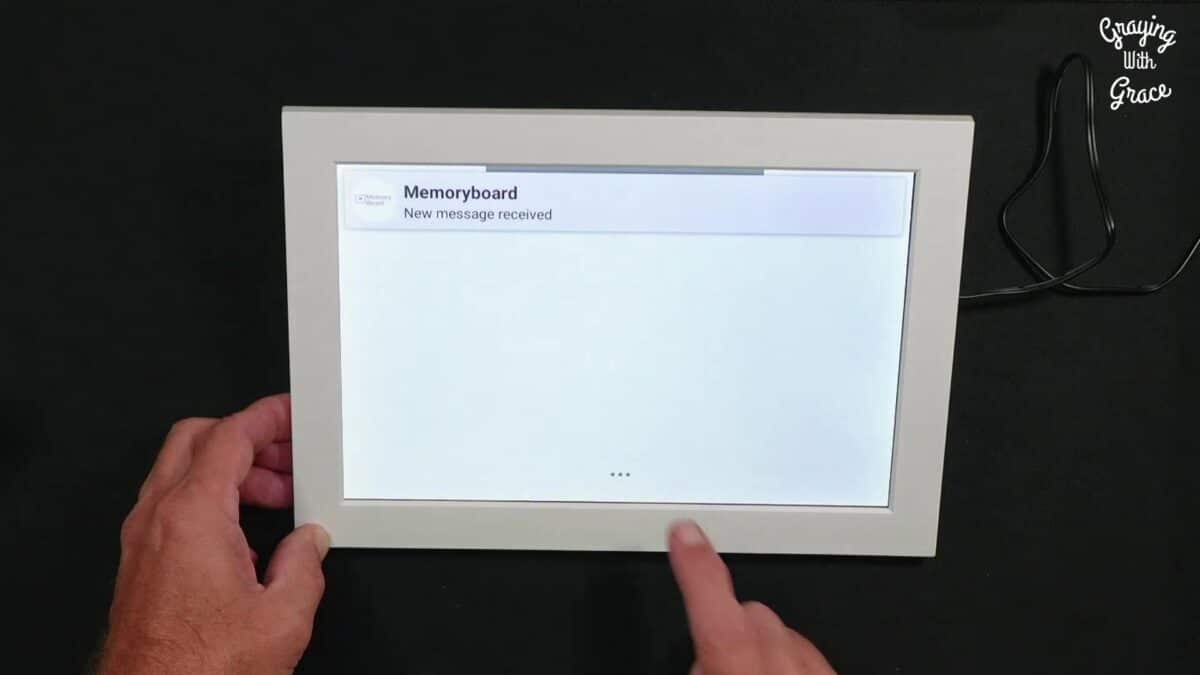
Step 6: Send Your First Message Type a message in the app, hit send, and watch it appear almost instantly on the Memoryboard screen. A gentle chime plays to alert your loved one that a new message has arrived.
That’s it. Getting started is easy—the best part is there are no confusing rows of buttons to navigate. Just a simple, hidden power button on the back means your loved one won’t accidentally change settings or turn off the device.
Features That Matter Most to Caregivers
Message Types and Flexibility
The Memoryboard supports three types of posts:
Text-Only Messages Send simple reminders, appointment notifications, or daily encouragement. Messages are limited to 140 characters—a constraint that actually improves communication by preventing text overwhelm and keeping messages clear and readable. This character limit also ensures shorter messages appear larger on screen, perfect for those with vision challenges.
You can schedule these as one-time posts (“Doctor appointment today at 3 PM”) or recurring reminders (“Take morning meds with breakfast” appears every day at 8 AM).
Photo-Only Posts Sometimes a picture speaks more clearly than words. Post a photo of a grandchild’s smile, a family pet, or seasonal decorations. For loved ones whose reading comprehension has declined, these visual connections offer comfort without requiring them to process text.
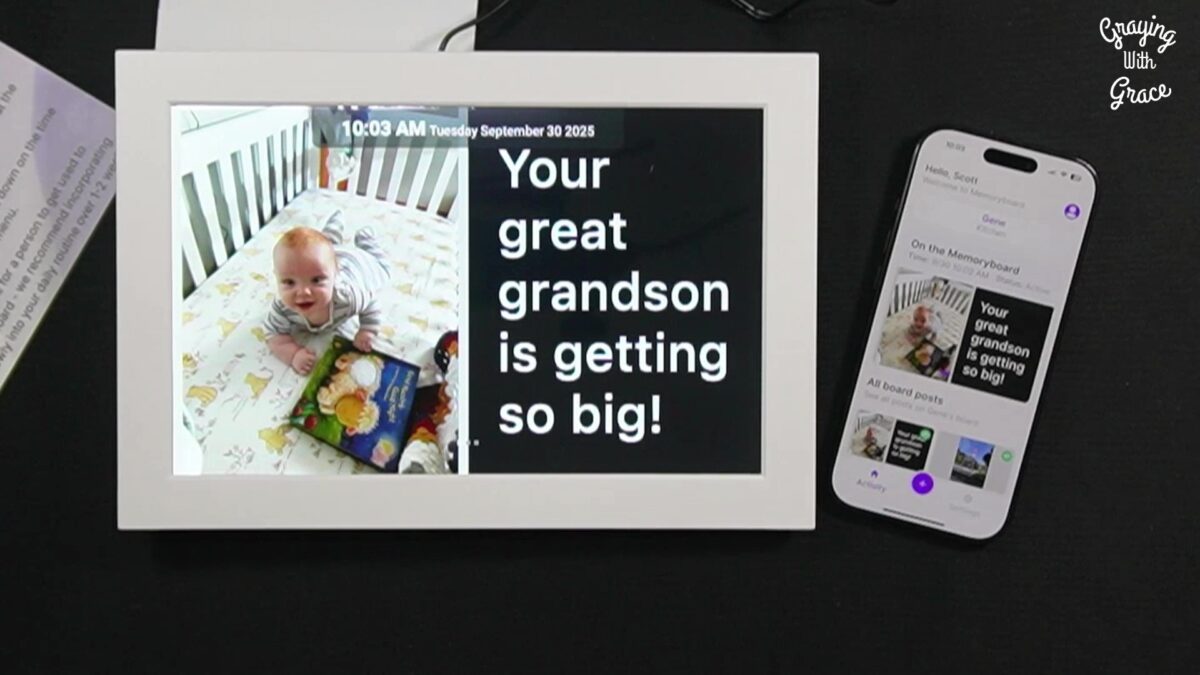
Photo + Message Combination This is where the system really shines. A photo of a caregiver’s face alongside “See you at 2 o’clock today” provides both visual recognition and clear information. A picture of dinner with “In the fridge—heat 2 minutes” removes all ambiguity about which container to grab.
The combination of visual and written cues addresses multiple cognitive challenges at once.
Care Circle Collaboration
Here’s where the Memoryboard differentiates itself from other communication tools: unlimited family members can participate in the Care Circle, and everyone can post AND edit each other’s messages.
Why does editing matter? Imagine your sister posts “Doctor appointment Tuesday at 2 PM” but the appointment gets rescheduled. Your brother can update that message immediately rather than posting a conflicting correction. This creates one reliable source of information rather than a confusing stream of updates.
Real-time synchronization means when one family member posts a message, everyone in the Care Circle sees it in their app instantly. This transparency prevents the common caregiver problem of not knowing what information your loved one has already received.
Display and Readability
The Memoryboard automatically sizes text based on message length. A short “I love you” appears in large, bold letters. A longer reminder stays clear but scales to fit the screen comfortably.
You can toggle between two high-contrast display options:
- Black text on white background (traditional, easier in bright rooms)
- White text on black background (reduces glare, highlights urgent messages)
Many caregivers use the contrast toggle strategically—switching to white-on-black for critical reminders like doctor appointments so they visually stand out from routine daily messages.
The matte screen reduces glare from windows and overhead lights, a detail that matters significantly for aging eyes.
Reliability Features
What happens when the Wi-Fi goes out? What about power outages?
In my testing, I found the Memoryboard handles connectivity issues gracefully. If the Wi-Fi drops, the current messages stay visible on screen—your loved one never sees a blank display. As soon as the connection returns, the board updates automatically with any new messages.
After a power outage, the device restarts and reconnects to Wi-Fi on its own. No manual troubleshooting required, no need to walk your loved one through resetting anything.
Posts arrive on the board almost instantly after you send them, accompanied by a gentle, non-startling chime to draw attention. This immediate feedback creates a satisfying connection between caregiver and loved one—you know they’re seeing your message right now, not hours later.
Customization Options
You can adjust several settings directly on the Memoryboard by swiping down from the date and time display:
- Date and Time: Set the correct time zone
- Wi-Fi Network: Connect to a different network if needed
- Screen Brightness: Adjust for different lighting conditions or night viewing
- Chime Volume: Raise, lower, or mute the notification sound
Additionally, you can schedule “waking hours” in the app so the screen goes dark overnight. This prevents nighttime disruption—particularly important for loved ones who might become agitated by a glowing screen during restless hours.
The Memoryboard comes in two sizes:
- 10.1-inch model: Ideal for smaller spaces like a bedroom nightstand
- 15.6-inch model: Better for larger rooms or when your loved one views from a distance
Real-Life Experience: Day-to-Day Use
For the Person with Dementia
The beauty of the Memoryboard is that it requires absolutely nothing from your loved one. Messages rotate automatically every five seconds if multiple posts are scheduled. They can simply glance at the screen periodically and see what’s there.
If they want more control, they can swipe between posts manually or tap on a photo to keep it displayed. But this interaction is entirely optional—the device works perfectly well as a passive information display.
For the Caregiver
Managing the Memoryboard happens entirely from your smartphone, no matter where you are. Visiting family across the country? You can still post messages. Stuck in a meeting? Schedule reminders in advance during your morning coffee.
The app interface is intuitive. Creating a message takes seconds. Scheduling recurring reminders for medications or weekly activities takes a minute of setup and then runs automatically.
One feature I particularly appreciated: you can schedule messages days or even weeks in advance. Before leaving for vacation, you could queue up daily “thinking of you” messages to post while you’re away.
Durability and Maintenance
The device feels lightweight but sturdy enough to move between rooms if needed. You can wall-mount it or use the included stand for tabletop placement.
Maintenance is minimal—essentially none beyond occasional dusting. The device stays plugged in continuously, messages are managed from your phone, and software updates happen automatically over Wi-Fi.
One detail worth noting: there are USB and microSD card slots on the back of the device, but these aren’t functional yet. The company plans to add functionality for uploading photos directly from these sources in a future update.
Will You Be Able to Use It?
Technical Requirements
The Memoryboard requires:
- Stable Wi-Fi connection in your loved one’s home
- Continuous power (must stay plugged in)
- At least one caregiver with an iOS or Android smartphone
If your loved one lives in an area with unreliable internet or frequent power outages, this might create challenges. While the device handles temporary disruptions well (messages persist during outages), consistent connectivity is needed for the system to function as intended.
Physical Setup Considerations
Where you place the Memoryboard matters significantly:
Choose a familiar, trusted location. Position it near where your loved one spends most of their time—beside their favorite chair, on the kitchen table where they eat breakfast, or on a dresser they pass multiple times daily.
Secure the power cord. For loved ones who might unplug devices, use cord covers or position furniture to block easy access to the outlet.
Consider viewing distance and angle. The screen should be easily visible without requiring your loved one to get up or move closer. Avoid direct sunlight that creates glare.
Think about room lighting. The matte screen reduces glare, but positioning still matters. Test visibility from their typical viewing spots.
Cognitive Considerations
The Memoryboard works best for individuals with early-to-moderate dementia. Your loved one should be able to:
- Read and process short text messages
- Recognize family members in photos
- Understand the concept that messages are coming from family
- Not be significantly disturbed by the presence of a screen
For those with more advanced dementia who might become agitated by electronic devices, unplug them repeatedly, or no longer process written information, this tool may not be appropriate.
However, even loved ones with declining reading ability can benefit from photo-only posts—visual connection doesn’t require literacy.
Help When You Need It
Customer Support
One consistent theme in customer reviews is praise for responsive support. Multiple reviewers mention that company leadership actively helps troubleshoot issues, sometimes working persistently over several days to resolve technical problems.
In my own experience, I sent several emails with questions during my evaluation, and all were answered within just a few hours. This responsiveness is critical when dealing with technology in a caregiving context—you don’t have the luxury of waiting days for answers.
The company provides:
- Email and chat support
- Comprehensive FAQ documentation
- Setup assistance when needed
- Responsive problem-solving
This level of support matters tremendously when you need help quickly.
Warranty and Returns
The Memoryboard comes with a 30-day return window. If the device doesn’t meet your needs or doesn’t work well for your situation, you can return it for a refund.
The one-time purchase model protects you from ongoing financial commitment if circumstances change. Unlike subscription services that require cancellation, once you own the Memoryboard, there are no additional fees regardless of how long you use it.
Understanding the Investment
Pricing Structure
The Memoryboard is sold as a one-time purchase with no monthly subscription fees. This pricing model makes it particularly attractive for families on fixed incomes who need to control ongoing expenses.
Two size options are available at different price points:
- 10.1-inch model (smaller, more affordable)
- 15.6-inch model (larger screen, easier to read from a distance)
Exclusive discount for Graying With Grace readers: Use promo code GWG15 at checkout for 15% off your purchase.
Value Assessment
How does the Memoryboard compare to alternatives?
Vs. Constant Phone Calls Phone calls are free but cost you time and emotional energy multiple times daily. They also feel intrusive to your loved one. The Memoryboard reduces call frequency dramatically while maintaining connection.
Vs. Sticky Notes Sticky notes are inexpensive but create clutter, get lost, become outdated, and can’t be managed remotely. They’re also a one-way communication tool.
Vs. Smart Displays (Alexa, etc.) General-purpose smart displays offer more features but create overwhelming complexity. Voice commands confuse many seniors. Privacy concerns arise with always-listening microphones. The Memoryboard’s focused simplicity is its strength.
Vs. Traditional Day Clocks Digital day clocks display date and time but can’t receive custom messages from family or show photos. They’re passive information displays without the emotional connection element.
The Memoryboard occupies a unique middle ground: more capable than static displays, simpler than general-purpose smart devices, and specifically designed for dementia care communication.
Hidden Costs
There are virtually no hidden costs:
- Uses your existing home Wi-Fi (no additional internet fees)
- Electricity usage is minimal (similar to leaving a nightlight on)
- No subscription, licensing, or service fees
- No replacement parts needed regularly
The purchase price is the total cost.
Important Considerations: When Memoryboard May Not Be Right
Let me be direct about situations where the Memoryboard might not be the best solution:
Situational Limitations
No Reliable Wi-Fi or Power If your loved one lives in a rural area with frequent internet outages or experiences regular power disruptions, the Memoryboard’s functionality will be limited. While it handles temporary outages well, it needs consistent connectivity to work as intended.
Advanced Dementia Stages For individuals who no longer recognize family in photos, cannot process written information, or have a pattern of unplugging or hiding devices, the Memoryboard may create more problems than it solves. The device works best when your loved one can still engage with visual information.
Significant Hearing Loss The notification chime is the only audio cue. While you can adjust volume, the tone itself cannot be customized. For those with severe hearing impairment, this limits the device’s ability to draw attention to new messages. The automatic message rotation provides a backup, but immediate notification is compromised.
Device Interference Risk If your loved one has a history of unplugging electronics, hiding remotes, or becoming agitated by screens, placement becomes critical. You’ll need to secure cords and choose locations carefully. In some cases, this behavioral pattern makes the device impractical.
Physical Space Requirements
The Memoryboard needs:
- Dedicated surface or wall space in a high-traffic area
- Proximity to an electrical outlet
- Position where it’s naturally visible (not tucked away)
Small living spaces or rooms without convenient outlets may require creative problem-solving or may not accommodate the device well.
When to Consider Alternatives
If your loved one has advanced dementia: In-person care, simplified analog clocks, or automated medication dispensers may serve you better.
If there’s no Wi-Fi: Traditional day clocks, large-print calendars, or dry-erase boards remain effective low-tech options.
If hearing loss is severe: Voice-based reminder systems (though more complex) may work better if audio notification is critical.
If budget is extremely limited: Free solutions like family phone calls, shared digital calendars, or printed weekly schedules may be necessary.
The Memoryboard excels in specific circumstances. Recognizing when those circumstances don’t apply prevents disappointment.
Making It Work for You: Tips for Success
If you decide the Memoryboard is right for your family, these strategies will help you get the most from it:
Placement Strategies
Position the device where your loved one naturally looks throughout the day. Common successful placements:
- On the kitchen table where they eat meals
- Beside the TV in their living room
- On a dresser they pass multiple times daily
- Next to their favorite chair
Avoid direct sunlight that creates screen glare. Test visibility from their usual viewing spots before finalizing placement.
Message Best Practices
- Keep messages short and clear. The 140-character limit isn’t just a restriction—it forces you to communicate concisely, which improves comprehension.
- Use simple, direct language. Avoid ambiguous phrasing. “Doctor visit today at 2 PM” is clearer than “Don’t forget your appointment this afternoon.”
- Include emojis for visual interest. A heart emoji, smiley face, or relevant icon adds color and emotional warmth to text messages.
- Combine photos with text for reinforcement. When possible, pair important information with relevant images. Visual + verbal cues work better than either alone.
- Use contrast strategically. Switch to white text on black background for critical reminders that need to stand out.
Care Circle Management
- Invite all regular caregivers. Include everyone who provides care or support, even if they only help occasionally. More eyes on the communication stream prevent gaps.
- Establish posting guidelines. Have a brief family discussion about who posts what type of content. This prevents overwhelming your loved one with too many messages or conflicting information.
- Use the editing feature. When plans change, edit the existing message rather than posting a correction. This keeps information clean and prevents confusion.
- Post consistently. Regular daily messages (even simple “good morning” greetings) establish a routine. Your loved one begins to anticipate and look for these touchpoints.
Troubleshooting Common Issues
- If the device isn’t syncing: Check that Wi-Fi is connected (swipe down from date/time to access settings). Verify the app and device are linked with the correct sync code.
- If messages aren’t displaying: Confirm messages haven’t expired (posts disappear at the end of each day). Check that the device is powered on and connected to Wi-Fi.
- If your loved one isn’t noticing messages: Adjust screen brightness for better visibility. Increase chime volume. Consider repositioning the device to a more prominent location.
- If you need help: Don’t hesitate to contact support. The company’s responsiveness is one of its strengths—they’ll work with you to resolve technical issues.
My Recommendation
Who Should Get the Memoryboard?
The Memoryboard is ideal for:
- Families caring for loved ones with early-to-moderate dementia who can still process visual information and benefit from regular reminders and emotional connection.
- Long-distance caregivers who want to maintain daily presence in their loved one’s life despite physical distance.
- Multiple family members coordinating care who need a single, reliable communication hub that everyone can access and update.
- Those seeking non-intrusive reminder solutions that preserve dignity and independence while ensuring safety and connection.
- Caregivers experiencing guilt or stress from constant phone calls who need peace of mind that reminders are being delivered without feeling like they’re nagging.
- Tech-comfortable caregivers with non-technical loved ones—the perfect mismatch where the caregiver manages everything from their phone while the loved one receives information without any technical burden.
Who Should Look Elsewhere?
The Memoryboard may not be appropriate for:
- Advanced dementia stages where device interference is likely or cognitive processing has declined significantly.
- Homes without reliable Wi-Fi where connectivity issues would create frustration.
- Those with severe vision or hearing impairments where the visual display and audible chime don’t adequately convey information.
- Extremely budget-limited situations where the upfront investment isn’t feasible (though remember there are no ongoing costs).
Final Verdict
After hands-on testing and evaluation, the Memoryboard earns my recommendation for families in the right circumstances. The combination of thoughtful design specifically for dementia care, ease of use for both caregivers and loved ones, absence of subscription fees, and reliable performance makes it a valuable tool in the caregiving toolkit.
What impressed me most wasn’t any single feature but rather how the device solves the real emotional challenges of caregiving: the guilt of feeling intrusive, the stress of constant communication, the worry that your loved one feels forgotten between visits, and the frustration of family members working at cross-purposes.
The Memoryboard doesn’t cure dementia or eliminate caregiving challenges. But it does create a gentle, consistent communication channel that reduces stress for everyone involved. Sometimes the simplest tools make the biggest difference.
Is it perfect? No—the fixed chime tone, Wi-Fi dependency, and lack of voice read-aloud limit its application in certain situations. But for families dealing with early-to-moderate dementia in connected homes, it fills a genuine need that other products don’t address as effectively.
Medical Disclaimer: Always consult with your loved one’s doctor before making decisions about their care. The Memoryboard is a communication tool, not a medical device, and should be used as part of a comprehensive care plan developed with healthcare professionals.
Where to Get It
The Memoryboard is available for direct purchase from the company website. Choose between:
- 10.1-inch model (ideal for smaller spaces)
- 15.6-inch model (better for larger rooms or distance viewing)
Exclusive discount: Use promo code GWG15 at checkout for 15% off your purchase.
The device typically ships within a few business days and includes everything needed to get started. Remember, you have 30 days to try it risk-free—if it doesn’t work well for your situation, you can return it for a refund.
Frequently Asked Questions
Does the Memoryboard require a subscription? No. The Memoryboard is a one-time purchase with no monthly fees, subscription costs, or hidden charges.
What happens if the Wi-Fi goes out? Current messages remain visible on screen during Wi-Fi outages. Once connectivity returns, the board automatically updates with any new messages. No manual intervention required.
Can multiple family members send messages? Yes. The Care Circle allows unlimited family members and caregivers to post messages. Everyone can also edit each other’s posts to keep information accurate and prevent conflicting messages.
Will my loved one need to do anything to see messages? No. Messages appear automatically and rotate every five seconds if multiple posts are scheduled. Your loved one can interact with the screen if they choose (swiping between posts or tapping photos), but it’s designed to work without any action on their part.
Can I schedule recurring reminders? Yes. You can schedule both one-time messages (for appointments or special events) and recurring reminders (for daily medications, weekly activities, etc.). Set the days of the week, times, start dates, and end dates as needed.
Is the data secure and private? Yes. Messages and photos are encrypted in the company’s database. Only people invited to your Care Circle can view or post messages. If you stop using the device, the company can delete all your data upon request.
What if my loved one has trouble reading? You can send photo-only posts that don’t require reading at all. Visual connection works even when literacy declines. For those with mild reading challenges, shorter messages automatically display in larger text.
Can I try it risk-free? Yes. The Memoryboard comes with a 30-day return policy. If it doesn’t meet your needs, you can return it for a refund.
How do I adjust settings like brightness or volume? Swipe down from the date and time display on the Memoryboard screen to access settings. You can adjust Wi-Fi connection, screen brightness, and chime volume directly on the device.
What sizes are available? The Memoryboard comes in two sizes: 10.1-inch (better for smaller spaces like bedroom nightstands) and 15.6-inch (ideal for larger rooms or viewing from a distance).
Have questions about whether the Memoryboard is right for your situation? Drop them in the comments below—I’d be happy to help you think through your specific caregiving challenges.


![Elderly man sending message park 1[1]](https://www.grayingwithgrace.com/wp-content/uploads/2025/12/elderly_man_sending_message_park-11-e1765809786193-450x300.jpg)
![Older woman walker daughter garden walk[1]](https://www.grayingwithgrace.com/wp-content/uploads/2025/11/older_woman_walker_daughter_garden_walk1-e1763402910723-450x300.jpg)
![Elderly woman drinking water thanksgiving table[1]](https://www.grayingwithgrace.com/wp-content/uploads/2025/11/elderly_woman_drinking_water_thanksgiving_table1-1-e1762886522997-450x300.jpg)


