
What happens in the minutes between a fall and when someone finally realizes help is needed? For older adults living at home, that gap can make a serious difference in health outcomes. It is one of the most common fears I hear from family caregivers, and honestly, it keeps a lot of older adults from feeling confident in their own homes.
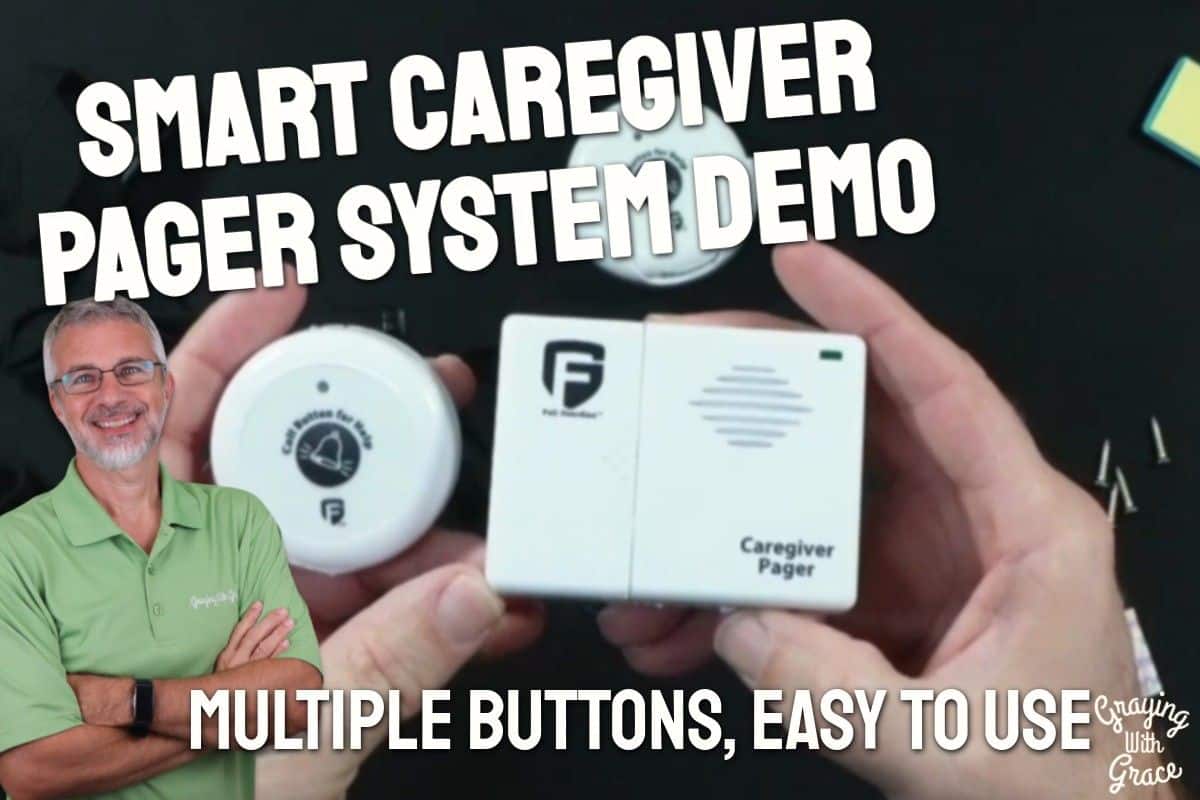
The good news is that closing that gap does not have to mean paying for a monthly medical alert subscription or installing a complicated smart home system. The Smart Caregiver Pager System with 2 Call Buttons is a straightforward, affordable solution designed to keep older adults connected to their caregivers with a single press of a button.
As a Certified Senior Advisor (CSA) and Senior Home Safety Specialist (SHSS) at Graying With Grace, I have personally evaluated this system — including a hands-on video demonstration — so I can give you an honest, practical picture of what it does well and where it falls short. Whether you are an adult child caring for an aging parent, a professional caregiver, or a senior who wants to live independently with a reliable safety net, this review is written for you.


Quick Takeaways
- Problems it solves: Delayed response to falls, caregiver anxiety, patient isolation, and the high cost of monthly monitoring services
- Who benefits most: Older adults living at home with a caregiver present, adult children managing care from another room, and professional home health aides
- Worth the investment? Yes — especially for households where a caregiver is already on-site and a simple alert system is all that is needed
- Best feature for seniors: The wearable lanyard button means help is always within reach, even after a fall
- Biggest limitation: This is not a medical alert system — it will not contact 911 or outside help if no caregiver is present in or near the home
How This Could Help You
Imagine your mother is home while you are doing laundry in the basement. She feels dizzy getting up from the couch. Without a way to reach you, she either struggles to the stairs and risks a fall, or she waits — and worries. With this system, she presses a button she is already wearing around her neck, and your pager alerts you immediately. You are upstairs within seconds.
That is exactly the kind of everyday scenario this pager system is designed for. It is not built for dramatic emergencies where 911 is needed. It is built for the quieter, more common moments — needing help to the bathroom, feeling unsteady, wanting a glass of water, or simply needing reassurance that someone is close by.
Could a wearable button give your loved one more confidence to move around the house? Quite possibly. Many older adults restrict their own movement because they are afraid no one will hear them if something goes wrong. Knowing that help is one button press away can genuinely reduce that fear and encourage more independence.
For caregivers, the portable pager means you are no longer tethered to one room. You can tend to household tasks, step outside to check the mail, or care for another family member — all while staying connected. That kind of freedom is not a luxury. It is essential for sustainable, long-term caregiving.
Important Details You Should Know
The system is compact and lightweight. The call buttons are small enough to wear comfortably on a lanyard around the neck, and the pager clips easily to a belt or waistband. Neither component feels bulky or cumbersome.
The wireless range is rated at 300 feet, which covers the majority of single-family homes and most yards. As I noted in the video, walls, floors, and other obstacles can affect that range, so it is worth doing a quick walk-through test when you first set things up to confirm coverage in your specific home.
The system comes with one pager and two separate call buttons, which gives you real flexibility. You are not limited to a single alert location. The buttons can be worn, wall-mounted, or placed on a bedside table depending on what works best for your situation.
Build quality is solid for the price point. Users report reliable performance over years of regular use, and the U.S.-based customer support team is available for troubleshooting if anything ever goes wrong.
Getting Started
In the video, you can see that the unboxing experience is refreshingly simple. The box includes the pager, two call buttons, batteries for every component, two lanyards, an adhesive wall mount, double-sided foam tape strips, and screws for more permanent mounting. Everything you need is right there.
As I demonstrated in the video, setup comes down to inserting the batteries into each component. The call buttons each take one small A23 battery, accessible by removing a back cover with a small screwdriver. The pager takes two AA batteries and one CR-style battery, all of which slide in easily once you open the battery compartment.
There is no Bluetooth pairing, no app download, and no Wi-Fi connection required. The buttons and pager arrive pre-paired from the factory. Once the batteries are in, the system works. That is genuinely it.
The lanyard attaches by looping through a small peg on the call button — just pop off the cover, loop the lanyard, and snap the cover back on. The pager can be worn on a belt clip, hung from the second lanyard, or mounted on the wall using the included adhesive bracket.
Ready to discover more innovative strategies for healthy, comfortable aging? Subscribe to our newsletter for expert-tested tips and product recommendations designed specifically for older adults.
Features That Matter to You
The most important safety feature here is simple: the button is wearable. When I evaluated this product, I noticed immediately that the lanyard design allows the call button to stay with the user throughout the day — not sitting on a nightstand where it is out of reach the moment someone gets up to walk to the kitchen.
The pager offers two different alert tones. The first is a traditional doorbell-style sound. The second is a more urgent, attention-grabbing tone. As I demonstrated in the video, that second tone is loud enough that you would have a very hard time missing it — which is exactly what you want when someone needs help.
The standalone wireless design is a standout feature for older adults who are not comfortable with technology. There are no apps, no accounts to create, no passwords to remember, and no internet connection required. If your home Wi-Fi goes down, this system still works perfectly. That kind of reliability matters when safety is on the line.
The dual-button setup also provides a practical layer of redundancy. One button can be worn on the lanyard for daytime mobility, while the second can be mounted at the bedside for nighttime access. That way, the user is never in a situation where the button is out of reach.
Real Life Experience
When I evaluated this product hands-on for the video, a few things stood out right away. First, the setup genuinely takes just a few minutes. I had both call buttons and the pager fully operational before finishing the unboxing. There was no frustrating troubleshooting, no failed Bluetooth pairing attempts, and no need to call anyone for help.
As I demonstrated in the video, pressing the call button triggers an immediate alert on the pager — no delay, no lag. The alert is loud and distinct. In a typical home environment, it would be very difficult to miss.
Battery life is approximately six to twelve months depending on usage frequency, which is a reasonable lifespan for this type of device. When I walked through the battery types in the video, I confirmed that the call buttons use A23 batteries, the pager uses AA and CR-style batteries — all of which are widely available at pharmacies, grocery stores, and big box retailers. You will not be hunting for proprietary or hard-to-find replacements.
The call button does require a small screwdriver to access the battery compartment. That is worth knowing in advance so you have the right tool on hand when the time comes. It is a minor inconvenience, not a dealbreaker.
Maintenance beyond battery changes is essentially nonexistent. The components are simple, durable, and do not require any software updates or reconfiguration over time. Verified buyers consistently report systems functioning reliably for multiple years with minimal attention.
Will You Be Able to Use It?
The call button is designed to be pressed easily with one hand, which matters for older adults with limited grip strength or arthritis. The button surface is large enough to find and press without fine motor precision.
The lanyard keeps the button accessible even for users with limited reach or mobility challenges. As I noted in the video, wearing the button around the neck during waking hours means it is available even in a fall situation — as long as the user retains the ability to press it.
The pager is similarly uncomplicated for caregivers. The on/off switch and tone selector are straightforward physical controls — no touchscreen, no menu navigation. For caregivers who prefer simple, tactile controls over digital interfaces, this is a meaningful advantage.
For users with significant cognitive impairment, there may be a learning curve in remembering to wear the button or understanding when to press it. In those cases, consistent reinforcement and a simple routine of putting the lanyard on each morning can help build the habit.
Important Considerations
I want to be straightforward about the most important limitation of this system: it is not a medical alert service, and it will not contact 911. When someone presses the button, the caregiver’s pager alerts — and that is it. If no caregiver is home, the alert goes unheard. This system is designed for situations where a caregiver is already present in the home or on the property.
If your loved one lives completely alone for significant stretches of time, a traditional medical alert service with automatic 911 dispatch capability may be a more appropriate solution for those hours.
The waterproof rating of the call button is not clearly specified, which is worth considering if you plan to use it in or near the bathroom. Mounting a button on the wall near the shower or tub — rather than relying on a worn button in high-moisture situations — is the safer approach until you can confirm the moisture resistance of the specific unit you receive.
The 300-foot range covers most standard homes, but if you live in a very large home or a multi-unit property, you should test the range thoroughly before committing to a particular button placement.
Seniors living in assisted living facilities should check with facility management before purchasing, as many communities have their own alert systems and may have policies about personal devices.
Always consult with your doctor or occupational therapist before making health-related product decisions, particularly if fall risk or cognitive decline is a concern.
Help When You Need It
Smart Caregiver Corporation offers lifetime customer support through a U.S.-based team. When I evaluated the product, this stood out as a genuine differentiator. You are not navigating an overseas call center or waiting on email responses from an automated system. Real Americans who know the product are available to help you troubleshoot or answer questions.
The company also backs the product with a lifetime warranty, which speaks to their confidence in the system’s durability. If something fails, you have a support path available.
Replacement batteries are standard sizes available at virtually any retail location, so ongoing maintenance costs are minimal and convenient.
Understanding the Cost
This system represents exceptional value compared to the alternatives. Monthly medical alert monitoring services typically run in the range of several dozen dollars per month — costs that add up quickly over the course of a year. This pager system requires a single purchase with no ongoing subscription fees. For households where a caregiver is already present and the primary need is in-home communication, the long-term savings are substantial.
The one-time investment pays for itself relatively quickly when compared to even a few months of a typical monitoring service subscription. And because there are no recurring fees, the value grows the longer you use the system.
If you do need 24/7 outside monitoring for a loved one who lives alone, a traditional medical alert service may be worth the ongoing cost. But for in-home caregiving situations, this system is a smart, budget-conscious choice that does not compromise on the core function you need.
Making It Work for You
Build a simple routine around the call button. Every morning, the user puts the lanyard on — just like putting on glasses or taking morning medication. Making it part of a daily habit eliminates the most common failure point: the button sitting unused on a table when it is needed most.
Place the second button strategically. The bedside is an excellent choice since the user will not be wearing the lanyard while sleeping. A bathroom wall mount near the toilet or shower is another high-value location given that bathrooms are among the most common fall sites in the home.
Test the system together before relying on it. Walk the caregiver through the home while pressing the button from different rooms to confirm the range is adequate and the alert is audible in every location the caregiver typically spends time.
Keep the pager on. It sounds obvious, but the most common user error with any alert system is forgetting to keep the receiving device powered on and within earshot. Wearing it on a belt clip during waking hours eliminates that risk entirely.
Finally, keep a small screwdriver in a designated spot — a kitchen junk drawer, a bathroom cabinet — so that when battery replacement time comes, you are not scrambling to find the right tool.
Our Recommendation
The Smart Caregiver Pager System with 2 Call Buttons earns a strong recommendation for the right situation. It is one of the most practical, accessible, and genuinely useful alert tools available for in-home caregiving — and it delivers on its core promise without requiring any technical skill, ongoing fees, or internet dependency.
This system is an excellent fit for adult children caring for aging parents at home, professional caregivers managing one or more clients in a home setting, and seniors who live with family members or roommates and want a reliable way to ask for help. It is also a smart choice for anyone looking to reduce or eliminate a monthly medical alert subscription while maintaining solid communication capability.
It is not the right solution if your loved one lives completely alone without regular caregiver presence, or if the need is for automatic 911 dispatch rather than in-home communication. In those cases, a traditional monitored medical alert service is worth exploring.
But for the wide range of everyday home caregiving situations? This system delivers real peace of mind at a genuinely accessible price point. It is simple enough that anyone can use it on day one, reliable enough to count on long-term, and backed by a support team that actually answers the phone.
Where to Get It
The Smart Caregiver Pager System with 2 Call Buttons is available on Amazon. Use the link on this page to check current pricing and availability — pricing can change, and Amazon occasionally runs promotions worth taking advantage of. The link will take you directly to the product listing so you can review the details and make your purchase with confidence.
Conclusion
At the end of the day, this system does something that genuinely matters: it puts the power to ask for help directly in the hands of the person who needs it. That is not a small thing. For older adults who worry about being a burden, or who are afraid of what might happen if they cannot reach someone, having a button they can press at any moment changes the emotional landscape of daily life in a meaningful way.
And for caregivers who are already stretched thin, the freedom to move through the house — to do the laundry, cook a meal, step outside — without constantly hovering is not just convenient. It is sustainable. It is what makes long-term caregiving at home actually work.
If you have questions about whether this system is the right fit for your specific situation, I encourage you to leave a comment below. I read every one and I am happy to help you think it through. You are not in this alone.
![Elderly man sending message park 1[1]](https://www.grayingwithgrace.com/wp-content/uploads/2025/12/elderly_man_sending_message_park-11-e1765809786193-450x300.jpg)
![Older woman walker daughter garden walk[1]](https://www.grayingwithgrace.com/wp-content/uploads/2025/11/older_woman_walker_daughter_garden_walk1-e1763402910723-450x300.jpg)
![Elderly woman drinking water thanksgiving table[1]](https://www.grayingwithgrace.com/wp-content/uploads/2025/11/elderly_woman_drinking_water_thanksgiving_table1-1-e1762886522997-450x300.jpg)
![Asian grandfather granddaughter arranging potluck[1]](https://www.grayingwithgrace.com/wp-content/uploads/2025/11/asian_grandfather_granddaughter_arranging_potluck1-e1762874989504-450x300.jpg)
![Older woman with cane cooking with son[1]](https://www.grayingwithgrace.com/wp-content/uploads/2025/11/older_woman_with_cane_cooking_with_son1-e1762874788231-450x300.jpg)
![Woman in car contemplating visit[1]](https://www.grayingwithgrace.com/wp-content/uploads/2025/11/woman_in_car_contemplating_visit1-e1762204672199-450x300.jpg)
![Older hispanic woman daughter care note outdoors[1]](https://www.grayingwithgrace.com/wp-content/uploads/2025/10/older_hispanic_woman_daughter_care_note_outdoors1-e1761040659377-450x300.jpg)
![Black man digital message display[1]](https://www.grayingwithgrace.com/wp-content/uploads/2025/10/black_man_digital_message_display1-e1761037921875-450x300.jpg)


