
What Happens If Mom Falls and No One Is Close Enough to Hear Her?
That question keeps a lot of families up at night. You want your parent or loved one to maintain their independence, but you also know that a fall — or any sudden medical emergency — can go terribly wrong when help is not within reach. It is one of the most common fears I hear from adult children and caregivers in my work as a Certified Senior Advisor and Senior Home Safety Specialist at Graying With Grace.
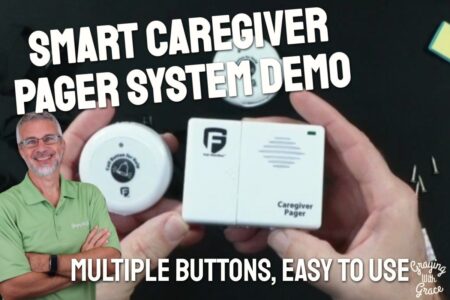
The STECHRO Caregiver Pager is designed to address exactly that fear. It is a simple, wireless, one-button emergency alert system that allows an older adult to summon help instantly — without dialing a phone, speaking a word, or navigating any technology. No monthly fees. No contracts. No app required.
STECHRO provided me with this product so I could put it through its paces and share an honest, hands-on evaluation with you. I have tested it, demonstrated it on video, and looked at it through the eyes of both the older adult wearing the button and the caregiver on the receiving end of the alert. Here is everything you need to know before you decide if it is right for your situation.


Quick Takeaways
- Problem it solves: Gives older adults a reliable, instant way to call for help without using a phone — critical during falls, medical events, or moments of confusion.
- Who benefits most: Older adults with limited mobility, arthritis, or early cognitive changes who live with or near a caregiver.
- Worth the investment? Yes — especially if you are currently paying monthly fees for a traditional medical alert service and your loved one rarely leaves home.
- Best feature for seniors: Truly one-button operation. There is nothing to remember, no numbers to dial, and no screen to read.
- Biggest limitation: The receiver plugs into the wall, so it will not work during a power outage. You need a backup plan for that scenario.
How This Could Help You
Think about the last time you worried about a parent being alone in the house. Maybe they had a close call in the bathroom. Maybe you work from another room and sometimes do not check in for hours at a time. That quiet anxiety is exhausting — both for you as the caregiver and for your loved one who may feel like a burden every time they need something.
The STECHRO Caregiver Pager changes that dynamic in a meaningful way. Instead of constant check-ins or the nagging worry of “what if,” your loved one simply wears or keeps the SOS button within reach. If something goes wrong — a fall, a dizzy spell, sudden chest pain — they press the button once. One press. That is all it takes.
For someone living with arthritis or hand tremors, the ability to bypass a phone entirely is huge. No fumbling with a touchscreen. No trying to remember a phone number under stress. No speaking required if pain or panic makes that difficult. The button does all the communicating for them.
What does that mean for daily life? It means your loved one can move around the house more freely and confidently, knowing help is always within reach. It means you can step outside to the garden, take a shower, or focus on your own tasks without that gnawing worry. It means the relationship between caregiver and care recipient can breathe a little — because the safety net is already in place.
Important Details You Should Know
The STECHRO system comes with two components: a small, lightweight SOS button and a plug-in receiver unit. The button is compact enough to wear around the neck on a lanyard — which comes included — or on the wrist. It can also be mounted on a wall using the included double-sided foam tape, or kept on a nightstand or table within easy reach.
The receiver is a small plug-in unit that goes directly into any standard wall outlet. It is not battery-powered on its own, which is an important consideration I will address shortly. The build quality feels solid for a device in this category. The button has a protective silicone sleeve that adds grip and weather resistance, and the overall construction feels sturdy enough for daily handling.
The IP55 waterproof and dustproof rating means the button can handle splashes, steam, and the general messiness of a bathroom or kitchen environment. As I demonstrated in the video, the button can be worn near the shower or bathtub without concern about normal water exposure — though it should not be submerged. That rating also gives it resilience against dust and daily wear, which matters when a device needs to work reliably day after day.
The system is also expandable. You can add additional buttons or additional receivers — useful for larger homes or households where coverage needs to reach multiple areas.
Getting Started
Setup is genuinely simple, and that is not a throwaway marketing claim — I mean it in the most literal sense. When I evaluated this product, I noticed that the entire setup process takes less than a minute. You plug the receiver into the wall. It gives a brief two-tone chime and flashes its indicator light to confirm it is working. Then you pair it with the button — which comes ready to go — and you are done.
There is no app to download, no WiFi network to connect to, no account to create. As I showed in the video, it works almost exactly like a wireless doorbell. Press the button, the receiver rings. That is it.
A flat-head screwdriver is the only tool you will ever need — and only when it is time to change the battery in the SOS button. The button uses a CR32 battery, which is widely available at hardware stores and pharmacies. In the video, you can see that I had a small trick to share about reassembling the button after a battery change: align the side with the small projections next to the battery edge before snapping the cover back together. That little tip will save you some frustration if you ever need to swap batteries.
Ready to discover more innovative strategies for healthy, comfortable aging? Subscribe to our newsletter for expert-tested tips and product recommendations designed specifically for older adults.
Features That Matter to You
One-Button Simplicity
This is the defining feature of the entire system, and it is worth emphasizing. There is exactly one thing the person wearing the button needs to do: press it. No unlocking a screen. No selecting a contact. No waiting for a call to connect. For someone experiencing a frightening medical moment, that simplicity is not just convenient — it is potentially life-saving.
Adjustable Volume and Ringtones
The receiver offers five volume levels, from completely silent — where only the light flashes — up to 120 decibels. As I demonstrated in the video, that top volume level is genuinely loud. For comparison, 120 decibels is roughly equivalent to a chainsaw or a rock concert. If your caregiver has any degree of hearing loss, or if the receiver is placed in a room away from where they spend most of their time, that kind of volume range ensures the alert will not be missed.
The 58 available ringtones let you choose something distinctive and easy to recognize. You can cycle through them using the top button on the receiver and land on whatever works best for your household.
Waterproof Where It Counts
The bathroom is one of the highest-risk rooms in any home for older adults. Wet floors, slippery surfaces, and limited space all contribute to fall risk. Having a call button that can withstand bathroom conditions — steam, splashes, humidity — means protection is available exactly where it is most needed.
No Technology Barriers
This system requires absolutely no WiFi, no phone line, no smartphone, and no app. It operates independently of your home network and keeps working even if your internet goes down. For older adults who feel overwhelmed by technology, or who simply do not use smartphones, this is a meaningful advantage.
Real Life Experience
When I evaluated this product, I noticed that the button has a satisfying, deliberate press to it — not so sensitive that it triggers accidentally, but not so stiff that someone with limited hand strength would struggle. That balance matters for daily wear.
In the video, you can see that the response from button press to receiver alert is essentially instantaneous. There is no noticeable delay. When your loved one presses that button, the receiver rings immediately — which is exactly what you want in an emergency.
For day-to-day living, the button can be worn around the neck or on the wrist using the included lanyard. It can also be mounted near the toilet, beside the bed, or on a shower wall using the foam tape. As I demonstrated in the video, you have real flexibility in how you deploy it throughout the home. A caregiver living in the same house might keep the receiver plugged in near the kitchen or living room during the day and move it to the bedroom outlet at night.
Battery maintenance on the button is straightforward. The receiver runs on wall power, so there is nothing to replace there. For the button, I recommend setting a quarterly reminder on your phone to check and test the battery. As I showed in the video, swapping the battery is easy once you know the reassembly trick — and CR32 batteries are inexpensive and easy to find.
Cleaning is simple too. A damp cloth works fine for wiping down both the button and the receiver. The silicone sleeve on the button is easy to clean and provides a non-slip grip that holds up well over time.
Will You Be Able to Use It?
If you can press a single button, you can use this system. That is the honest answer. The physical demand is minimal — a gentle press with one finger is all it takes. For someone with moderate arthritis or reduced hand strength, the button size and tactile feedback are manageable.
The lanyard option keeps the button accessible at all times without requiring the user to remember where they left it. If wearing it around the neck is uncomfortable, the wrist option or a mounted placement near frequently used areas works just as well.
For the caregiver side, operating the receiver is equally simple. Adjusting volume and ringtone requires pressing one of two buttons, and I walked through that clearly in my video demonstration. There is no learning curve to speak of.
One thing to be honest about: this system does require the user to intentionally press the button when they need help. That means the person needs to be conscious, aware enough to recognize they need assistance, and physically able to reach and press the button. For most older adults living at home with a caregiver nearby, that is a perfectly reasonable expectation.
Important Considerations
I always want to be upfront about who a product is — and is not — right for, because trust matters more to me than making a sale.
This system is not designed for someone with advanced dementia who may not reliably remember to use the button or recognize when they need help. If cognitive decline is significant, a motion-activated sensor system or a more comprehensive monitoring solution would be a better fit.
The receiver requires wall power. This is the detail I want to make sure you do not overlook. As I pointed out in the video, if the power goes out, the receiver will not work. That means you need a backup communication plan for power outage scenarios — especially important in regions prone to storms or extended outages.
This is a one-way system. The caregiver receives the alert but cannot speak back through the device. After the alarm sounds, the caregiver should go to the person or call their phone to assess the situation. This is not a two-way intercom.
Range varies by home construction. The manufacturer rates this at up to 1,500 feet, which sounds impressive — but as I explained in the video, that is always the outdoor, open-air maximum. Concrete walls, metal appliances, and multiple floors will reduce that range meaningfully. Always test the system at the furthest distances you need coverage before relying on it. The portable nature of the receiver helps here — you can move it to whichever outlet gives you the best coverage for your specific home layout.
The button should not be submerged. IP55 is splash-proof and shower-steam resistant, but it is not designed for submersion. I recommend hanging it just outside the shower or tub — on a hook within easy arm’s reach — rather than wearing it directly in the water stream.
Always consult with your doctor or occupational therapist before making health-related product decisions, particularly when evaluating fall prevention and emergency response strategies.
Help When You Need It
The STECHRO Caregiver Pager comes with an 18-month warranty, which is notably longer than the standard 12-month coverage you see from many competitors. That extra six months of protection signals that the manufacturer has confidence in this product’s durability, and it gives you meaningful peace of mind after your purchase.
According to the product information, the manufacturer offers direct contact support — meaning you are not navigating a maze of corporate phone menus if something goes wrong. That kind of direct access to help matters, especially when you are troubleshooting a safety device.
The CR32 button battery is a standard size available at most hardware stores, pharmacies, and online retailers, so replacement parts are never a concern.
Understanding the Cost
Here is where the STECHRO Caregiver Pager makes a genuinely compelling case for itself. Traditional monitored medical alert services typically require monthly subscription fees that add up to a significant annual expense. The STECHRO is a one-time purchase with no ongoing costs — no activation fees, no monthly minimums, no contracts, and no hidden charges.
If your situation calls for in-home communication between a senior and a nearby caregiver — rather than a monitored service with 24/7 emergency dispatch — then this system delivers comparable core functionality at a dramatically lower long-term cost.
It is also worth noting that this type of medical alert device may qualify for reimbursement through a Flexible Spending Account (FSA) or Health Savings Account (HSA). I always recommend verifying that with your specific plan, but it is worth exploring.
If your loved one lives alone without a nearby caregiver and needs 24/7 professional monitoring, a subscription-based medical alert service with a monitoring center would be the more appropriate choice. The STECHRO is not a replacement for that — it is an excellent, cost-effective alternative for households where a caregiver is present and reachable.
Making It Work for You
To get the most out of this system, I recommend building a simple weekly testing habit. As I suggested in the video, make it part of the morning routine — “Mom, go ahead and press your button so we know everything is working.” That quick test confirms the battery is good, reinforces the habit of using the button, and gives both of you confidence in the system.
Placement matters too. Think through the specific moments and locations where your loved one is most vulnerable — the bathroom, the bedroom at night, a favorite chair near the back of the house — and make sure the button is accessible in all of those spots. Remember that you can add additional buttons if you want dedicated buttons in multiple locations, rather than relying on a single wearable button.
Move the receiver to the outlet that gives you the best coverage for your daily routine. If you spend mornings in the kitchen and afternoons in the backyard, test whether the receiver can reach you from those locations and position it accordingly. The portability of the receiver is a genuine advantage here.
Set a calendar reminder every three months to test the button battery and keep a spare CR32 on hand so you are never caught without one. And if power outages are a concern in your area, talk through a backup communication plan — whether that is a neighbor who checks in or a battery-powered phone kept charged and accessible.
Our Recommendation
The STECHRO Caregiver Pager earns a solid recommendation from me for the right situation. It does exactly what it promises — simple, reliable, one-button emergency communication between an older adult and a nearby caregiver — and it does it without the complexity or ongoing expense of subscription-based alternatives.
This is a great fit if: your loved one lives with you or near you, has a caregiver consistently within range of the receiver, and needs a low-tech safety net that bypasses the barriers of phones and apps. It is also a smart starting point for families who want to improve home safety without committing to a monthly monitoring contract.
Consider looking elsewhere if: your loved one lives completely alone without a nearby caregiver, has advanced dementia that would prevent intentional button use, or needs professional 24/7 emergency dispatch coverage. In those cases, a monitored medical alert service with a response center is a better match.
For the many households where this system is a good fit — and there are a lot of them — it is a genuinely useful, well-designed tool that can meaningfully reduce both caregiver anxiety and the isolation that older adults sometimes feel when living with health or mobility challenges.
Where to Get It
The STECHRO Caregiver Pager is available on Amazon. You can find current pricing and availability, along with the full listing that shows all the bundle options — including multiple-button and multiple-receiver configurations — by checking the link on this page. Be sure to review the listing for any available variations that might better suit the size of your home or the number of locations where you want coverage.
The Bottom Line
Peace of mind should not require a monthly contract. For families who want a dependable, easy-to-use emergency alert system that an older adult can operate with a single button press — without any technology learning curve — the STECHRO Caregiver Pager is a practical, well-thought-out solution.
If you are weighing this option for a parent, a spouse, or yourself, I hope this review has given you a clear picture of what to expect. Set it up, test it regularly, and let it do its job quietly in the background — so that both you and your loved one can focus on living, rather than worrying.
Have questions about whether this system would work for your specific situation? Drop them in the comments below — I am happy to help you think it through.
![Elderly man sending message park 1[1]](https://www.grayingwithgrace.com/wp-content/uploads/2025/12/elderly_man_sending_message_park-11-e1765809786193-450x300.jpg)
![Older woman walker daughter garden walk[1]](https://www.grayingwithgrace.com/wp-content/uploads/2025/11/older_woman_walker_daughter_garden_walk1-e1763402910723-450x300.jpg)
![Elderly woman drinking water thanksgiving table[1]](https://www.grayingwithgrace.com/wp-content/uploads/2025/11/elderly_woman_drinking_water_thanksgiving_table1-1-e1762886522997-450x300.jpg)
![Asian grandfather granddaughter arranging potluck[1]](https://www.grayingwithgrace.com/wp-content/uploads/2025/11/asian_grandfather_granddaughter_arranging_potluck1-e1762874989504-450x300.jpg)
![Older woman with cane cooking with son[1]](https://www.grayingwithgrace.com/wp-content/uploads/2025/11/older_woman_with_cane_cooking_with_son1-e1762874788231-450x300.jpg)
![Woman in car contemplating visit[1]](https://www.grayingwithgrace.com/wp-content/uploads/2025/11/woman_in_car_contemplating_visit1-e1762204672199-450x300.jpg)


