RunStar Blood Pressure Monitor Review: Will It Help You?
Nearly half of American adults have high blood pressure — and many of them have no idea because checking it at home is either too confusing, too uncomfortable, or too easy to get wrong.
That’s a real problem. Standard blood pressure monitors often come with tiny displays, fiddly cuffs that need two hands, and zero feedback about whether you’ve even put the thing on correctly. For older adults managing hypertension, that’s not just frustrating — it’s a genuine health risk.
I’m Scott Grant, Certified Senior Advisor (CSA) and Senior Home Safety Specialist (SHSS) at Graying With Grace. I personally tested and demonstrated the RunStar Upper Arm Blood Pressure Monitor on video, and I’m going to walk you through everything you need to know before you decide whether it belongs in your home.
We’ll cover the setup, the real-world feel of using it, who it helps most, and where it falls short. No fluff, just honest answers.

Quick Takeaways
- Solves: Tiny displays, two-handed cuff struggles, unreliable readings, and missed irregular heartbeat warnings
- Best for: Adults 50+ managing hypertension, couples sharing one device, caregivers tracking a loved one’s trends, and anyone with a larger arm circumference
- Worth it? Yes — especially if you have FSA or HSA dollars to spend
- Best senior feature: Voice broadcast reads your results aloud so you don’t have to squint at anything
- Biggest limitation: No app or Bluetooth — all data stays on the device itself
How This Could Help You
Have you ever finished taking your blood pressure and immediately wondered, “Did I do that right?” That uncertainty is exhausting — and it defeats the whole purpose of monitoring at home.
The RunStar Upper Arm Blood Pressure Monitor is built specifically to eliminate that doubt. If the cuff isn’t on correctly, the monitor tells you on-screen before it even starts measuring. No more guessing, no more wasted readings.
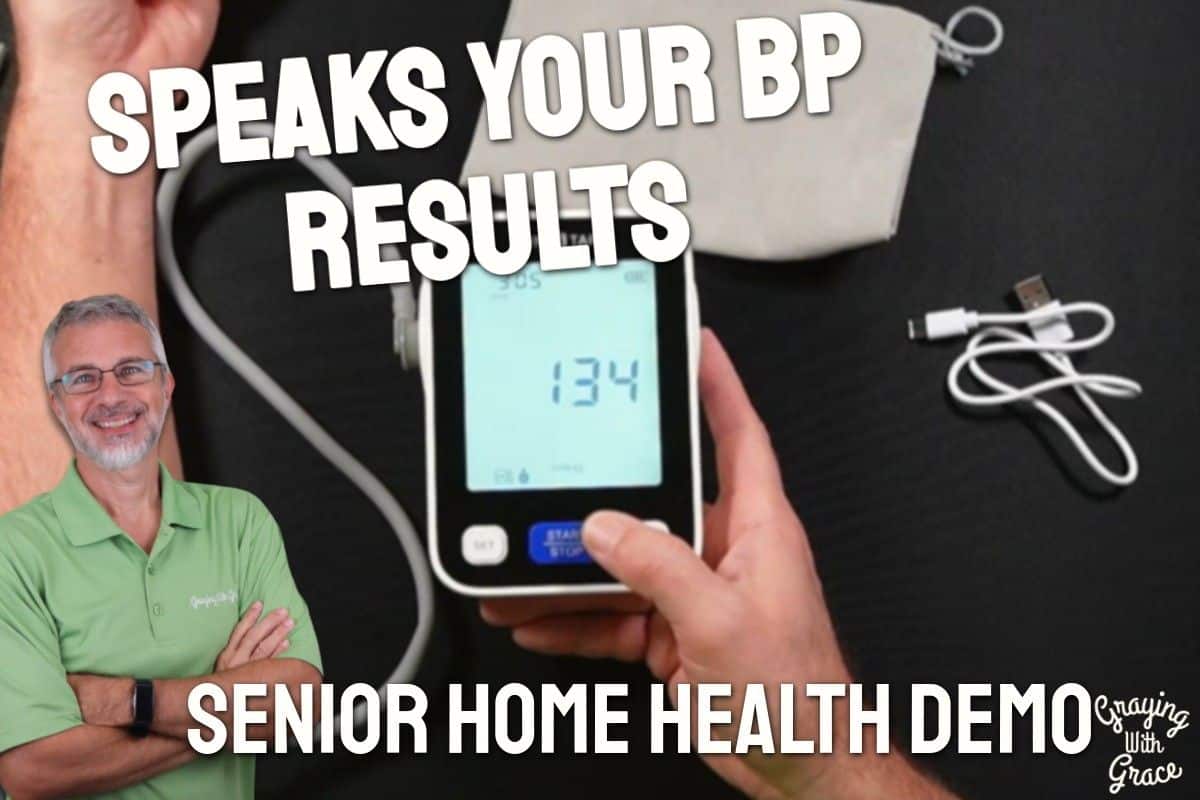
The voice broadcast feature is a genuine game-changer for anyone with aging eyes. After I took a reading during my hands-on evaluation, the device read my results out loud — systolic, diastolic, heart rate, and even a verbal note that my blood pressure was elevated. I didn’t have to glance at the screen once to know exactly what was going on.
If you have a spouse or a parent whose blood pressure you also want to track, the dual-user memory means you’re both covered with one device. No more sticky notes, no more handwritten logbooks. The monitor stores readings with date and time stamps automatically.
For caregivers, that organized history is invaluable. Instead of your parent saying “I think it’s been okay,” you can scroll through ninety-nine timestamped readings and have a real conversation with their doctor.
Important Details You Should Know
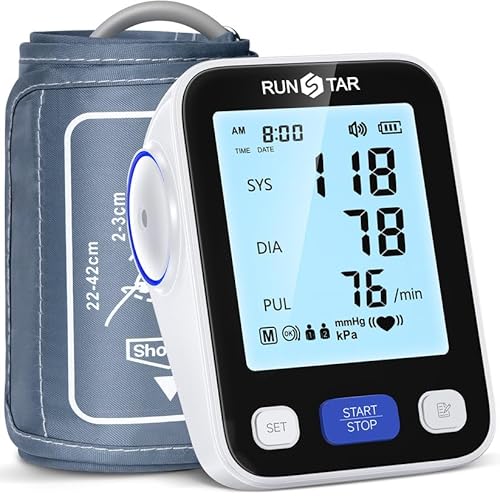
The monitor itself is a compact, table-top unit that sits comfortably on a nightstand or kitchen counter. It’s not bulky, but it’s solid — it doesn’t feel like a cheap toy.
The cuff fits arm circumferences between 8.6 and 16.5 inches. That wide range is genuinely useful. Standard cuffs often cut off around 13 inches, leaving people with larger arms frustrated and stuck with inaccurate readings.
The display is a 4.2-inch LCD with backlighting and a 30-degree tilt. When I evaluated this product, I noticed that when placed flat on a table at a normal seated position, the angle works naturally — you’re not craning your neck or leaning in to read numbers.
The unit runs on four AA batteries that come included in the box. It also has a USB-C charging port, so you have two power options depending on your preference.
The storage bag is a soft drawstring pouch that fits the monitor, cuff, and charging cord neatly. It’s a small touch, but it signals that RunStar expects you to use this thing for the long haul — not toss it in a junk drawer after a week.
Getting Started
In the video, you can see that unboxing this monitor takes about two minutes. You get the monitor unit, the upper arm cuff with a rotating connector plug, a hook-and-loop storage band for the cuff, a USB-C charging cord, four AA batteries, and the drawstring storage pouch.
Setup is straightforward. Drop in the batteries, connect the cuff tube to the unit (it rotates so you can position it comfortably), and then set the date and time.
One thing worth flagging: the clock runs on military time. As I demonstrated in the video, 6:24 AM is entered as 6:24 — but if you’re setting it for the afternoon, remember that 2:00 PM is 14:00. It’s a minor quirk that can trip people up if they’re not expecting it.
After the date and time, you’ll set the speaker on or off and choose which user profile you’re starting with. Then press the Start button to save everything and you’re ready to take your first reading.
No internet connection, no app to download, no Bluetooth pairing. Just batteries and a button press.
Ready to discover more innovative strategies for healthy, comfortable aging? Subscribe to our newsletter for expert-tested tips and product recommendations designed specifically for older adults.
Features That Matter to You
Let’s talk about what actually makes the RunStar Blood Pressure Monitor worth considering over a generic drugstore model.
Irregular Heartbeat Detection
This is the feature I want every older adult to pay attention to. Most basic monitors simply don’t have it. If an irregular heartbeat is detected during your measurement, a warning symbol appears on the display automatically — no interpretation required on your part.
That’s not a trivial feature. Arrhythmias can be silent and serious. Having a monitor that flags a potential concern during a routine morning check could prompt a conversation with your doctor that genuinely matters.
Voice Broadcast
After the measurement is complete, the monitor announces your systolic pressure, diastolic pressure, heart rate, and even a general status like “your blood pressure is high.” As I demonstrated in the video, I could hear the results clearly without looking at the screen at all.
You can toggle the voice off if you prefer silence — but for anyone with vision challenges, this feature is a real confidence builder.
Cuff Fit Verification
If the cuff is too loose or positioned incorrectly, the monitor displays an on-screen alert before delivering a reading. This prevents the frustrating scenario where you get a wildly different number and can’t figure out why.
The cuff also has printed guidance right on the fabric showing you exactly how to position it on your arm. As I pointed out in the video, there’s a small artery alignment marker you aim toward your inner arm, roughly pointing at your middle finger.
One-Hand Application
The cuff is designed to be applied with one hand. For anyone dealing with arthritis, a recovering shoulder, or limited grip strength in one hand, this matters enormously. You’re not wrestling with a stiff cuff or asking someone else to help you every morning.
Large Display with Tilt
When I evaluated this product, I noticed that the 30-degree screen tilt hits a natural reading angle when the monitor is sitting on a flat surface at table height. The backlighting keeps it readable even in dim morning light, and the font size is genuinely large — not “large for a blood pressure monitor” large, but actually large.
Real Life Experience
Using this monitor in practice feels calm and unhurried. You sit down, slide the cuff onto your upper left arm, press the Start button, and wait. The device tells you to relax and not move or talk — and about thirty seconds later, you have your reading.
As I demonstrated in the video, my own reading came back at 134 over 93 with a heart rate of 85. The monitor promptly announced those numbers out loud and noted my blood pressure was elevated — which, as I mentioned, was probably accurate given two cups of coffee and a morning of setting up filming equipment.
The cuff went on smoothly one-handed and came off without a fight. When I evaluated this product, I noticed the material isn’t stiff or scratchy — it’s soft against skin, which matters when you’re using something daily.
Maintenance is minimal. Wipe the cuff with a damp cloth if needed. Keep the unit away from extreme heat or moisture. Store everything in the included pouch between uses to protect the connector and cuff tube.
Battery life should be solid with AA batteries, especially if you’re taking one or two readings per day. The USB-C charging option gives you a backup if you’d rather plug it in than swap batteries.
Will You Be Able to Use It?
If you can press one button and slide a cuff onto your upper arm, you can use this monitor independently. The setup takes a few minutes the first time, but daily use is genuinely one-press simple.
Vision challenges? The large backlit display and voice broadcast together mean you have two ways to access your results without relying on sharp eyesight.
Limited hand strength or dexterity? The one-hand cuff application is a real advantage here. You’re not fumbling with a stiff velcro tab while trying to hold your arm steady.
Memory concerns? The date and time stamping removes the “when did I take this?” confusion entirely. The readings are just there, organized and waiting.
If someone has significant tremors or very advanced dexterity limitations, a caregiver may still need to assist with cuff placement. But for the vast majority of older adults, this device is designed for independent use.
Important Considerations
This monitor is not the right fit for everyone. Let me be straight with you about that.
If you want to sync readings to your phone, share data automatically with a family member’s app, or integrate with a health platform, this device won’t do that. There’s no Bluetooth, no Wi-Fi, no app. Data lives on the device and only on the device.
If you need continuous or passive monitoring — the kind a smartwatch provides around the clock — this isn’t that tool. It’s a clinical spot-check device, not a wearable sensor. That’s by design and actually produces more accurate readings, but it does require you to sit down and actively use it.
The military time format during setup can be confusing. If you set the time incorrectly, your reading timestamps will be off, which undermines the usefulness of your health history. Take an extra minute during setup to double-check your AM and PM conversions.
And as with any home health device: always consult with your doctor or occupational therapist before making health-related product decisions, and always call your doctor if you get a reading that seems significantly off or triggers an irregular heartbeat warning.
Help When You Need It
RunStar includes a storage pouch and all necessary accessories in the box, which suggests the company is thinking about the full ownership experience rather than just the out-of-the-box moment.
For warranty and customer support specifics, check the product listing on Amazon directly — terms can vary and are best confirmed at the time of purchase. Amazon’s standard return window also applies, which gives you a reasonable period to try the device in your actual home routine.
The USB-C charging design means the charging cord is easy to replace if it’s ever lost — it’s a standard cable you can find almost anywhere.
Understanding the Cost
The RunStar Upper Arm Blood Pressure Monitor sits in a competitive category, but its combination of features — voice broadcast, irregular heartbeat detection, wide-range cuff, dual-user memory, and cuff fit verification — places it well above basic entry-level monitors in practical value.
The FSA and HSA eligibility is a meaningful financial advantage. If you have pre-tax healthcare dollars sitting in a spending account, this qualifies — which effectively reduces your out-of-pocket cost in a way that many competing monitors don’t allow.
Think about what you’re getting in return: fewer clinic visits for routine monitoring, organized health data to bring to appointments, and a safety net for detecting irregular heartbeats early. For anyone managing hypertension or cardiac concerns, that’s a worthwhile investment in long-term peace of mind.
Making It Work for You
Take your readings at consistent times each day — ideally in the morning before coffee and medication, and again in the evening. Consistency is what makes home monitoring clinically useful. Your doctor isn’t just looking at one number; they’re looking at your pattern.
Sit quietly for five minutes before measuring. Avoid caffeine, exercise, and stress in the thirty minutes prior if possible. Sit with your back supported and your arm at heart level.
Set up both user profiles right away, even if your spouse isn’t sure they want to use it yet. It takes sixty seconds and means the device is ready when they change their mind.
If you get an irregular heartbeat warning, don’t panic — but do call your doctor and share that reading. The monitor is alerting you to something worth discussing, not diagnosing you with anything.
Store the monitor in the included pouch between uses. It protects the cuff tube, keeps the charging cord from going missing, and honestly makes it easier to grab when you travel.
Our Recommendation
The RunStar Upper Arm Blood Pressure Monitor earns a strong recommendation from me, particularly for older adults who want reliable, readable, and genuinely usable blood pressure monitoring at home.
It’s the right choice if you have vision challenges, arthritis, a larger arm, or a spouse you’d like to monitor alongside yourself. It’s also the right choice if you’ve ever looked at a reading and thought, “I’m not sure I can trust this” — the cuff verification and clinical-grade accuracy take that doubt off the table.
Look elsewhere if seamless smartphone integration or continuous passive monitoring is important to you. This monitor does one thing and does it very well: it gives you a fast, accurate, accessible blood pressure reading with safety features that basic monitors simply don’t offer.
For anyone using FSA or HSA dollars, this is one of the smarter ways to spend them.
Where to Get It
You can check current pricing and availability for the RunStar Upper Arm Blood Pressure Monitor on Amazon using the link below. It’s also FSA and HSA eligible, so check whether your benefits account covers it before checkout.
Conclusion
Blood pressure monitoring shouldn’t be a source of stress — it should be a quiet, confident part of your daily routine. The RunStar monitor is one of the few home devices I’ve tested that genuinely earns that calm.
Large display. Voice broadcast. One-hand cuff. Automatic safety alerts. Two-user memory. It’s a lot of thoughtful engineering packed into something that ultimately just asks you to press one button.
If you’re currently using a monitor that frustrates you, or you’ve been avoiding home monitoring altogether because past devices felt too complicated, this one is worth a serious look. And if you have questions or your own experience with home blood pressure monitors, I’d love to hear about it in the comments below.
![Older woman cooling towel garden[1]](https://www.grayingwithgrace.com/wp-content/uploads/2025/06/older_woman_cooling_towel_garden1-e1748521934198-450x300.jpg)