
Who Needs This Phone?
Think about the last time a family member missed an important call — a doctor’s appointment reminder, a check-in from a worried adult child, or worse, an emergency that went unanswered. For millions of older adults, that is not a hypothetical. It happens every day.
Standard phones were not designed with aging eyes, stiff fingers, or hearing loss in mind. The buttons are tiny, the ringers are weak, and the displays might as well be written in a foreign language for someone whose vision has changed over the decades.
As a Certified Senior Advisor and Senior Home Safety Specialist at Graying With Grace, I personally evaluated the Sacumea Big Button Phone for Seniors to find out whether it genuinely solves those problems — or just makes promises. Here is what I found.

Quick Takeaways
- Solves: Missed calls, misdialed numbers, and communication isolation caused by vision, hearing, or dexterity challenges
- Best for: Older adults with low vision, hearing loss, arthritis, tremors, or early cognitive decline — and the caregivers who support them
- Worth it? Yes, for anyone who needs a reliable, low-maintenance home phone that just works
- Best feature: The combination of 110dB+ ringer and flashing visual alert ensures calls are never missed
- Biggest limitation: The LCD display is not backlit, so low-light environments can make the screen harder to read
How This Could Help You
Imagine your mother sitting in her living room when her phone rings. She can hear it from the kitchen — clearly, without straining — because the ringer hits 110 decibels. She glances at the display, reads the large-print caller ID, and knows immediately it is her daughter calling.
No squinting. No fumbling with tiny buttons. No accidental hang-ups.
The Sacumea Big Button Phone for Seniors is built for exactly that kind of moment. Whether the challenge is fading eyesight, arthritic hands, or simply the anxiety of missing something important, this phone is designed to lower the barriers between older adults and the people they love.
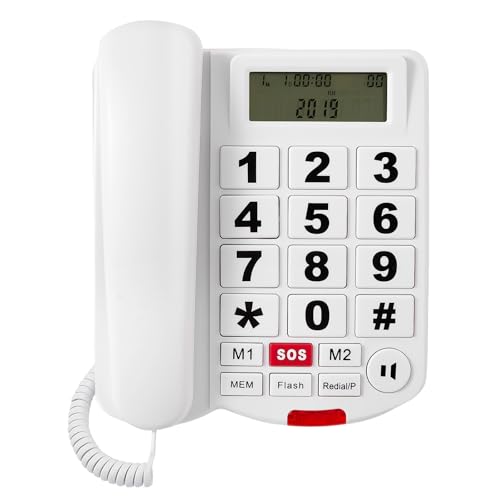
Have you ever watched someone with trembling hands try to dial a standard phone? The frustration is real. This phone addresses that directly with buttons that measure roughly three-quarters of an inch by an inch — generous enough to hit confidently, even with unsteady hands.
The speakerphone feature is a quiet hero here too. For anyone who struggles to hold a handset for long conversations, simply pressing one button puts the call on speaker. No gripping required.
Important Details You Should Know
This is a full-size corded landline phone with a substantial, solid build. It does not feel like a cheap plastic toy — when I held the handset during my evaluation, it had a reassuring weight and curved ergonomic shape that fits naturally in the hand.
The buttons are large and clearly labeled with high-contrast print. The LCD display is generous in size, though keep in mind it is not backlit — more on that in a moment.
The phone can sit flat on a desk or mount on the wall using included hardware. Both options work well, and the dual flexibility means you can place it wherever it is most accessible in the home.
There are no cordless components, no charging docks, and no wireless antennas. What you see is what you get — a simple, well-built corded phone.
Getting Started
Setup is refreshingly simple. As I demonstrated in the video, you connect the handset cord to the base until it snaps into place, then plug the phone line cord into the back of the phone and into your wall jack. That is it.
No power brick. No internet connection. No account to create.
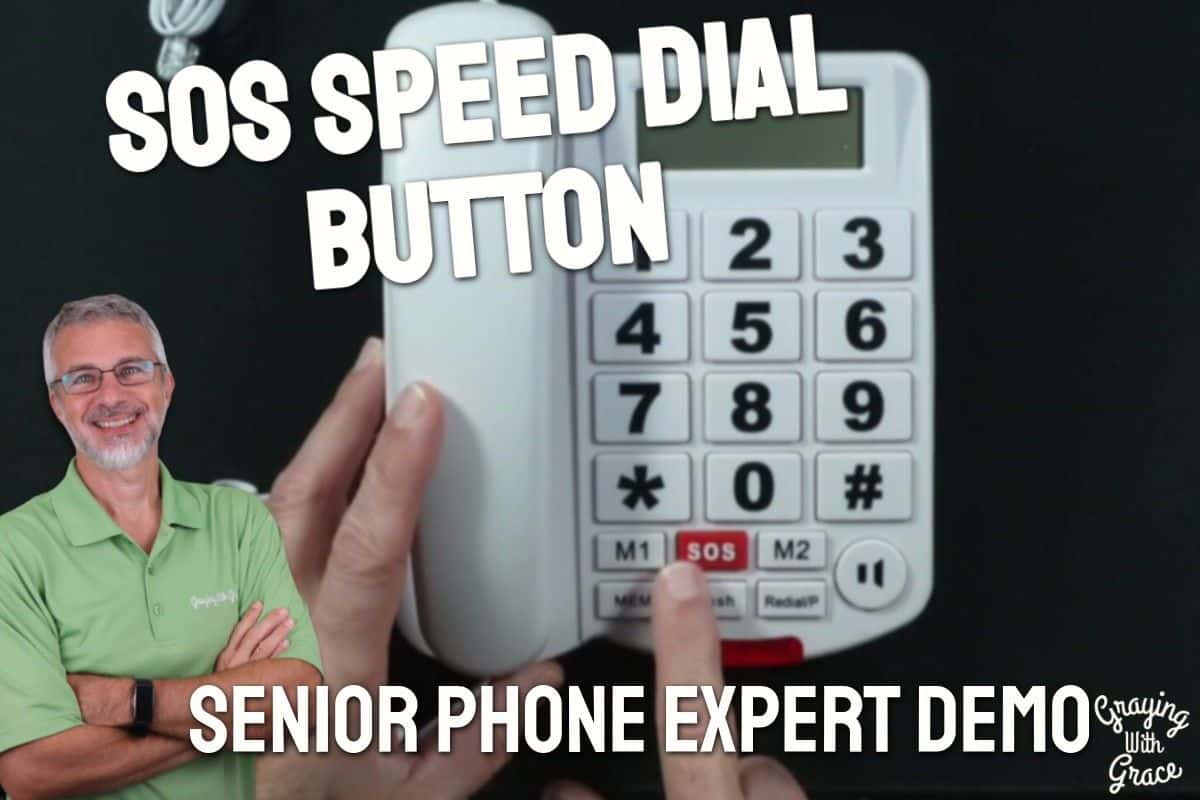
Programming the speed-dial and SOS buttons does require a few extra steps, but I walked through the process in the video and it is straightforward. You keep the handset down, dial the number, hit the memory button, then hold the speed-dial key you want to program for five seconds. Done.
Caregivers can handle this initial setup in under ten minutes. Once it is programmed, the senior using the phone never needs to touch those settings again.
The box includes the phone base, handset, handset cord, phone line cord, and wall-mounting screws. Everything you need is in the package.
Ready to discover more innovative strategies for healthy, comfortable aging? Subscribe to our newsletter for expert-tested tips and product recommendations designed specifically for older adults.
Features That Matter to You
Let me walk you through what actually matters in daily life — not the spec sheet, but the real-world experience of using this phone.
Those enormous buttons. In the video, you can see that the buttons are genuinely large — about three-quarters of an inch wide and over an inch tall. That is a meaningful difference from a standard phone keypad. They also have tactile feedback, meaning you feel a satisfying click when a button registers. That click matters enormously if you have tremors or reduced sensation in your fingertips.
The dual alert system. When I evaluated this product, I was impressed by how the 110-decibel ringer pairs with the flashing red light on the top of the phone. You get both sound and sight working together. For someone with significant hearing loss, that visual flash may be the difference between answering a call and missing it entirely.
The SOS button. This is one of my favorite safety features on the Sacumea Big Button Phone for Seniors. It is large, clearly labeled, and sits separately from the number pad so it cannot be accidentally confused with a regular dial button. You program it once to your most important emergency contact, and after that, one press connects your loved one to help. For someone with dementia or cognitive decline, that simplicity is priceless.
Hearing aid compatibility. As I noted in the video, this phone is designed to work with hearing aids — a detail that is easy to overlook but genuinely important for a large portion of older adults who rely on hearing devices daily.
Adjustable volume controls. The phone gives you separate volume settings for the ringer, the handset earpiece, and the speakerphone. When I evaluated this product, I noticed the handset volume goes up to what the manufacturer rates as 80 decibels — loud enough to make a real difference for those with mild to moderate hearing loss.
Real Life Experience
When I evaluated this product, I noticed the handset has a curved, ergonomic shape that genuinely feels comfortable to hold. It is not flimsy. It does not feel like something that will crack if dropped on a hardwood floor.
As I demonstrated in the video, assembly takes only seconds — plug the handset cord in until it snaps, connect the phone line cord, plug into the wall jack, and the phone is immediately operational. There is something deeply satisfying about a piece of technology that just works without a manual, an app, or a password.
In the video, you can see the LCD display showing caller information in large, easy-to-read print. The font size is dramatically larger than what you would find on a standard landline. During my hands-on evaluation, I held the phone at arm’s length and could read the display clearly — no reading glasses needed.
As I demonstrated in the video, the LCD brightness is actually adjustable. You hold down the flash button and then press a number from one to nine to select your preferred brightness level. This is a detail that was not obvious from the product listing, and it is genuinely useful for customizing the display to different lighting conditions in the home.
Maintenance is essentially nonexistent. There are no batteries to replace, no firmware to update, no filters to clean. Wipe it down with a damp cloth occasionally, and this phone should serve your family reliably for years.
Will You Be Able to Use It?
If you can press a button and lift a handset, you can use this phone. The design intentionally minimizes the physical and cognitive demands of making a call.
For someone with severe arthritis, the speakerphone option means you can answer and hold a full conversation without ever gripping the handset. The buttons require only light pressure — no forceful pressing needed.
For someone with early dementia or memory challenges, the speed-dial and SOS buttons mean the people they need most are just one press away. The caregiver sets everything up once, and the senior never needs to remember a phone number again.
For someone with low vision, the large-print display and oversized buttons remove the squinting and guessing that make standard phones so frustrating. Position the phone near a lamp to maximize display readability.
Initial speed-dial programming will likely need caregiver assistance. But once those numbers are set, the phone operates completely independently.
Important Considerations
The LCD display is not backlit in the traditional sense, though as I mentioned, you can adjust the brightness level through nine settings. Even at the highest setting, reading the screen in a very dark room may be challenging. Position the phone near a reliable light source.
This is a home phone only. It does not leave the house with you. If your loved one spends time outside the home alone, a separate mobile device or personal emergency response system is still worth considering as a complement.
The wall-mount process uses custom screws rather than a standard telephone wall plate. It is not complicated, but it is different from what many people expect. For renters or anyone hesitant to put hardware in the wall, desk placement is a perfectly fine alternative.
This phone requires an active landline telephone service. If your home uses only internet-based phone service (VoIP), confirm compatibility with your provider before purchasing. Standard POTS landline service works without any issues.
Caller ID display requires subscribing to Caller ID service through your telephone company — the phone itself does not create that service. Most providers offer it as an add-on.
Always consult with your doctor or occupational therapist before making health-related product decisions, particularly if you are choosing assistive technology for someone with significant cognitive or physical limitations.
Help When You Need It
Sacumea is a dedicated senior-focused product brand. Customer support is available through Amazon messaging if questions arise after purchase.
The phone is sold through Amazon, which provides its standard return window for most purchases. If the phone arrives damaged or does not perform as described, Amazon’s return process is straightforward.
Because this is a simple corded landline with no complex electronic components, the likelihood of needing support is low. There is nothing to update, no wireless signal to troubleshoot, and no battery to degrade over time.
Understanding the Cost
The Sacumea Big Button Phone for Seniors sits in a very accessible price range for what it delivers. When you compare it to medical alert systems or smart home communication devices, the value is striking.
There are no monthly subscriptions. No contracts. No ongoing fees beyond the optional Caller ID service from your phone company.
For a device that could directly support someone’s independence, safety, and daily connection with family, the long-term value is significant. A phone that helps someone stay connected and call for help when needed pays for itself quickly in both practical and emotional terms.
If budget is a concern, this phone represents one of the most affordable accessibility upgrades available for a senior’s home communication setup.
Making It Work for You
Place the phone somewhere your loved one spends most of their time — the living room or kitchen tends to work better than a bedroom hallway. Convenience matters when reaction time does too.
If wall space near a lamp is available, that is an ideal installation spot. The combination of bright ambient light and the high-contrast display will make the Caller ID easy to read at a glance.
Program the M1 and M2 speed-dial buttons with the two most frequently called numbers — typically an adult child and a doctor or neighbor. Use the SOS button exclusively for the person who should be called first in an emergency.
As I mentioned in the video, you can also tape a small labeled list to the back of the phone noting which numbers are stored in each memory slot. For someone with memory challenges, that simple paper reference can remove a lot of confusion.
If your loved one uses hearing aids, test the phone with the aids in place early on. The hearing aid compatibility feature should deliver noticeably clearer audio when paired correctly.
Our Recommendation
The Sacumea Big Button Phone for Seniors earns a genuine recommendation from me. It is purpose-built, thoughtfully designed, and it delivers on its core promises.
If you are shopping for an older adult with vision challenges, hearing loss, arthritis, or early cognitive decline, this phone addresses all of those needs in one affordable, reliable package.
It is also an excellent choice for caregivers who want peace of mind knowing that their loved one can reach help with a single button press — no smartphone required, no Wi-Fi needed, no complicated setup.
Where it falls short is portability and nighttime display readability. If your loved one needs communication support outside the home, pair this with a simple mobile device or wearable alert system. And place it near a light source to get the best from the display.
For a primary home phone designed around the real needs of older adults, this is a smart, caring choice.
Where to Get It
You can check current pricing and availability for the Sacumea Big Button Phone for Seniors on Amazon. Stock and pricing can change, so it is worth checking the link for the most up-to-date information before you order.
Conclusion
Staying connected is not a luxury — it is a lifeline. And for older adults navigating vision changes, hearing loss, or stiff, arthritic hands, that connection should not require a struggle every time the phone rings.
The Sacumea Big Button Phone delivers simplicity, safety, and genuine accessibility in one solid, no-fuss package. Set it up once, program those speed-dial numbers, and let it do its job.
Have questions about whether this phone is right for your situation? Drop them in the comments below — I read every one and I am happy to help you figure out the best fit for your family.



![Older woman receiving meal dignity[1]](https://www.grayingwithgrace.com/wp-content/uploads/2026/02/older_woman_receiving_meal_dignity1-e1771334664816-450x300.jpg)
![Older couple pottery wheel studio[1]](https://www.grayingwithgrace.com/wp-content/uploads/2026/02/older_couple_pottery_wheel_studio1-e1771334326831-450x300.jpg)
![Older couple sofa adult child support[1]](https://www.grayingwithgrace.com/wp-content/uploads/2026/02/older_couple_sofa_adult_child_support1-e1771334039968-450x300.jpg)
![Older woman side sleeping position peaceful[1]](https://www.grayingwithgrace.com/wp-content/uploads/2026/02/older_woman_side_sleeping_position_peaceful1-e1771333748525-450x300.jpg)


