Picture this: it’s 10 a.m., and you’ve already called your mom twice. Once to remind her about her morning pills. Once because she forgot what day it was. And now you’re sitting at your desk, half-focused on work, waiting for the anxiety to ease up enough to get something done.
Sound familiar? You’re not alone — and neither is she.
That daily phone call loop is one of the most common struggles I hear about from family caregivers. It’s exhausting for everyone involved, and the hard truth is that repeated check-in calls can actually increase anxiety for someone with dementia, not reduce it. Each call forces them to reorient: who called, what did they want, did I do what they asked?
I’m Scott Grant, Certified Senior Advisor (CSA) and Senior Home Safety Specialist (SHSS) at Graying With Grace. I’ve spent over 20 years working with older adults and their families, and when I first evaluated the MemoryBoard Daily Calendar and Reminder System, I had a feeling it was going to resonate. What I didn’t expect was the flood of messages from caregivers telling me it was genuinely changing their daily lives.
This review covers everything you need to know: how it works, who it helps, what real families are experiencing, and where it falls short. No fluff, just the honest picture.
If you want the full walkthrough first (unboxing, setup, the family app and the Care Circle), I cover it step by step in my complete Memoryboard guide for dementia caregivers.

Quick Takeaways
- Breaks the phone call loop — reminders appear automatically on the screen, no call required
- Best for older adults with dementia, hearing loss, arthritis, or anyone for whom the phone has become a barrier
- Worth the investment for families managing daily reminders, visit prep, and long-distance connection
- Standout feature for seniors: completely passive — they just look at the screen, no interaction needed
- Biggest limitation: caregivers need a smartphone and Wi-Fi to manage it remotely
How This Could Help You
Have you ever wished there was a way to remind your loved one about their medication without interrupting their morning — or yours? The MemoryBoard Daily Calendar and Reminder System does exactly that.
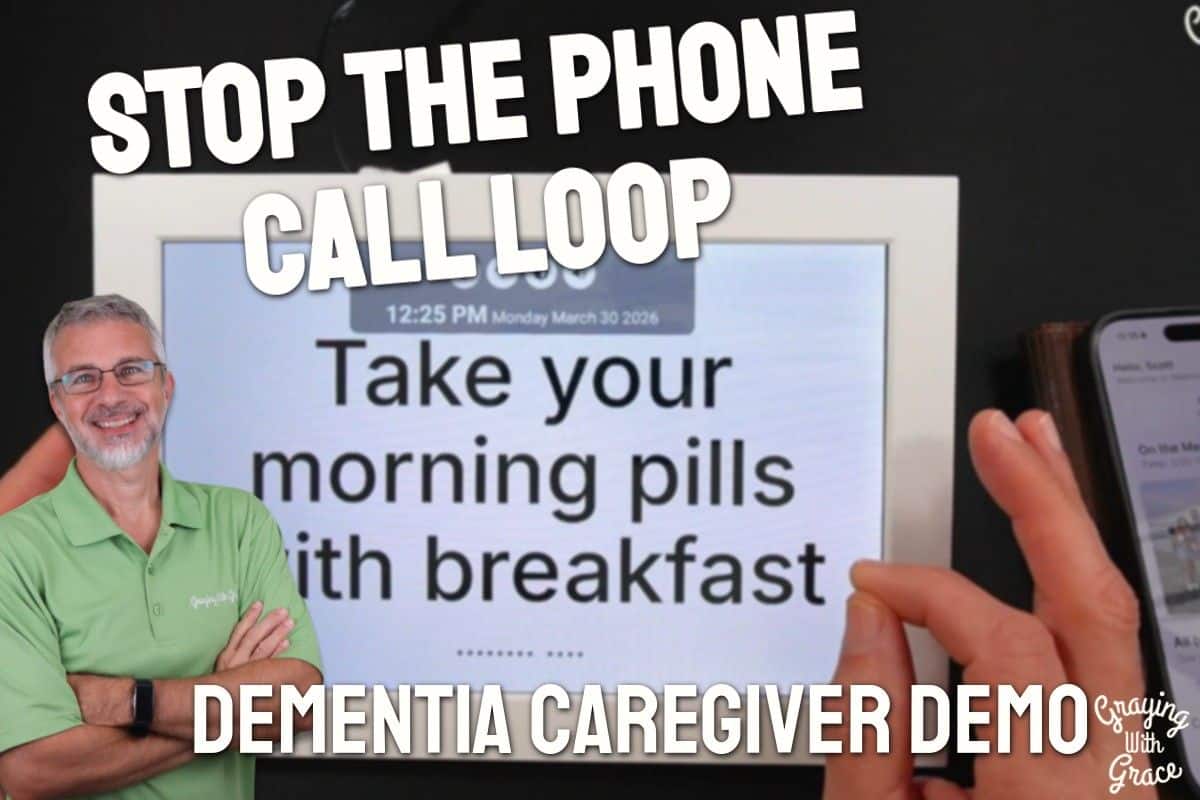
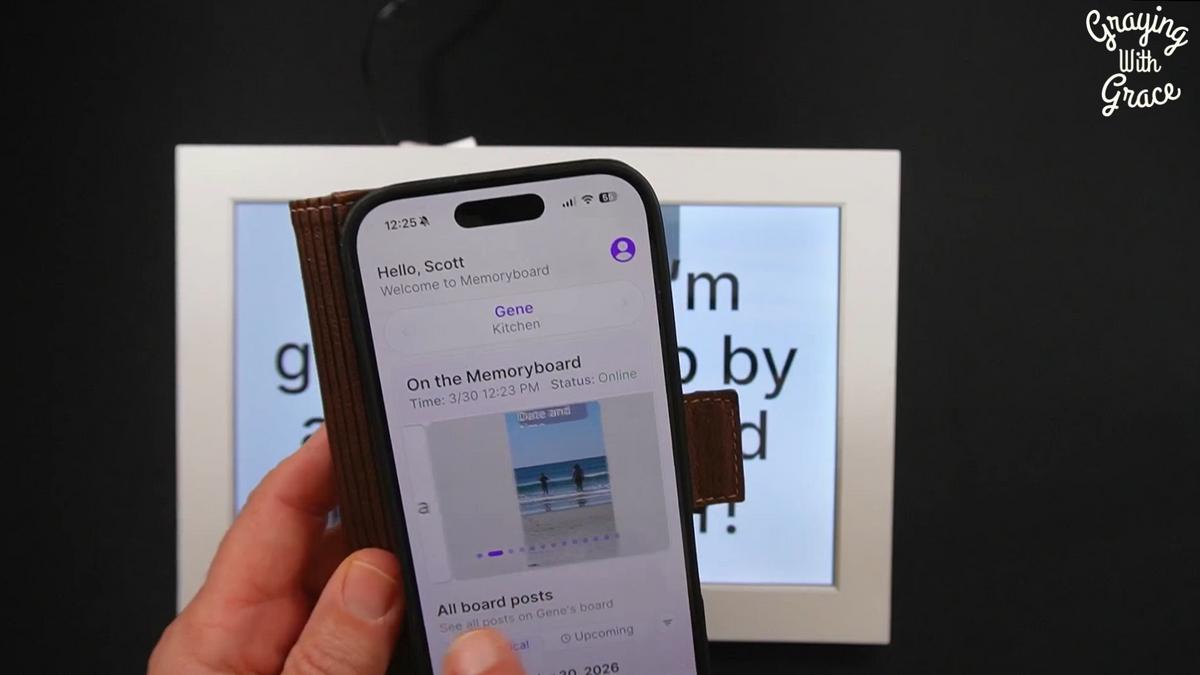
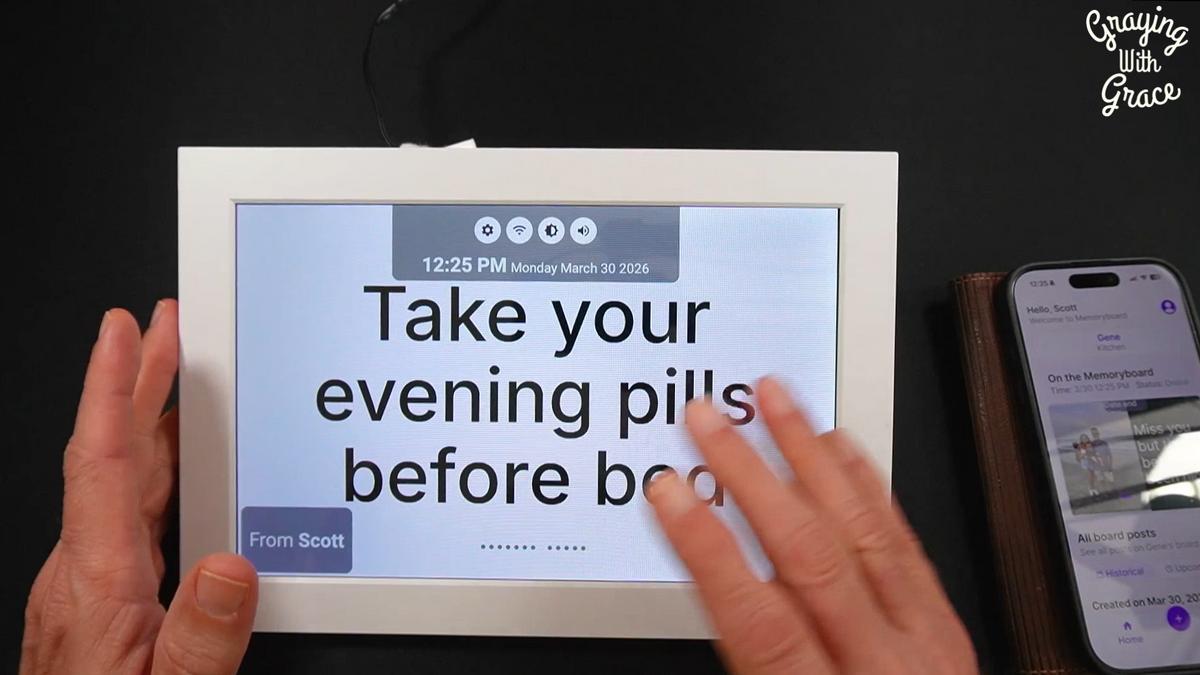
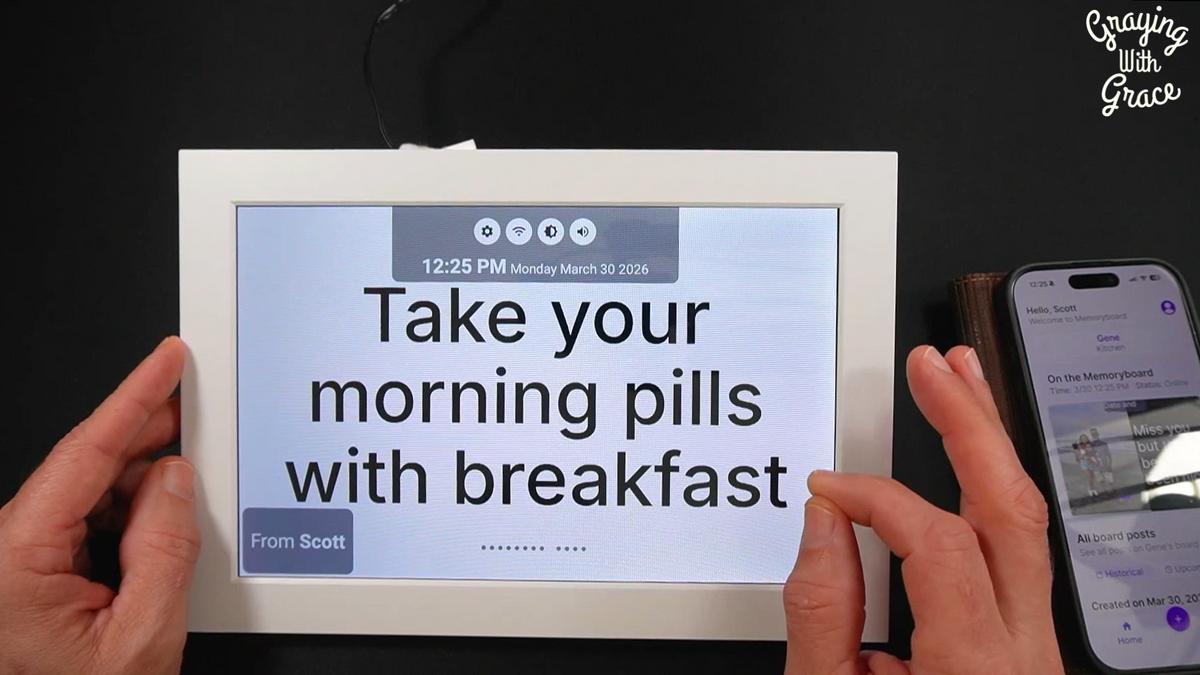
Family members send messages, reminders, and photos from a smartphone app. Those messages appear automatically on a dedicated display screen sitting right in your loved one’s home. No buttons to press. No passwords. No phone to answer.
As I demonstrated in the video, the setup is genuinely simple — about five minutes from unboxing to up and running. Once it’s going, you manage everything remotely from your phone, no matter where you are.
Think about what that means for a typical morning. A caregiver I spoke with set up a recurring message so her mother woke up every day to “Take your morning pills with breakfast” already on the board when she sat down to eat. No call required.
That’s not just convenient. It’s dignity-preserving. Her mom felt like she was remembering on her own — and for someone whose independence dementia has already chipped away at, that feeling matters enormously.
Beyond medication reminders, families are using it to prepare loved ones for visits, share vacation photos in real time, coordinate schedules across siblings, and simply send a daily message that says: someone is thinking about you today.
Important Details You Should Know
The MemoryBoard comes in two sizes: a 10-inch and a 15-inch display. The 15-inch is the better choice for anyone with vision challenges, since larger text and images are easier to read from across a room.
It’s designed to sit in your loved one’s living space — on a counter, a side table, or mounted on a wall. It needs to be plugged in and connected to Wi-Fi, so placement near an outlet and a reliable wireless signal matters.
The screen is clean and uncluttered by design. There are no confusing menus, no remote controls, and nothing for your loved one to accidentally change or turn off.
Getting Started
Setup takes roughly five minutes, and that’s not marketing language — that’s what I observed firsthand. You plug in the device, connect it to Wi-Fi, download the companion app on your smartphone, and you’re in business.
The caregiver — not the older adult — does all the configuration. Your loved one never needs to touch the device to set it up or operate it.
You’ll want a family member who’s reasonably comfortable with a smartphone to handle the app side. It doesn’t require any special tech skills, but someone does need to be in charge of sending messages and managing the care circle.
Ready to discover more innovative strategies for healthy, comfortable aging? Subscribe to our newsletter for expert-tested tips and product recommendations designed specifically for older adults.
Features That Matter to You
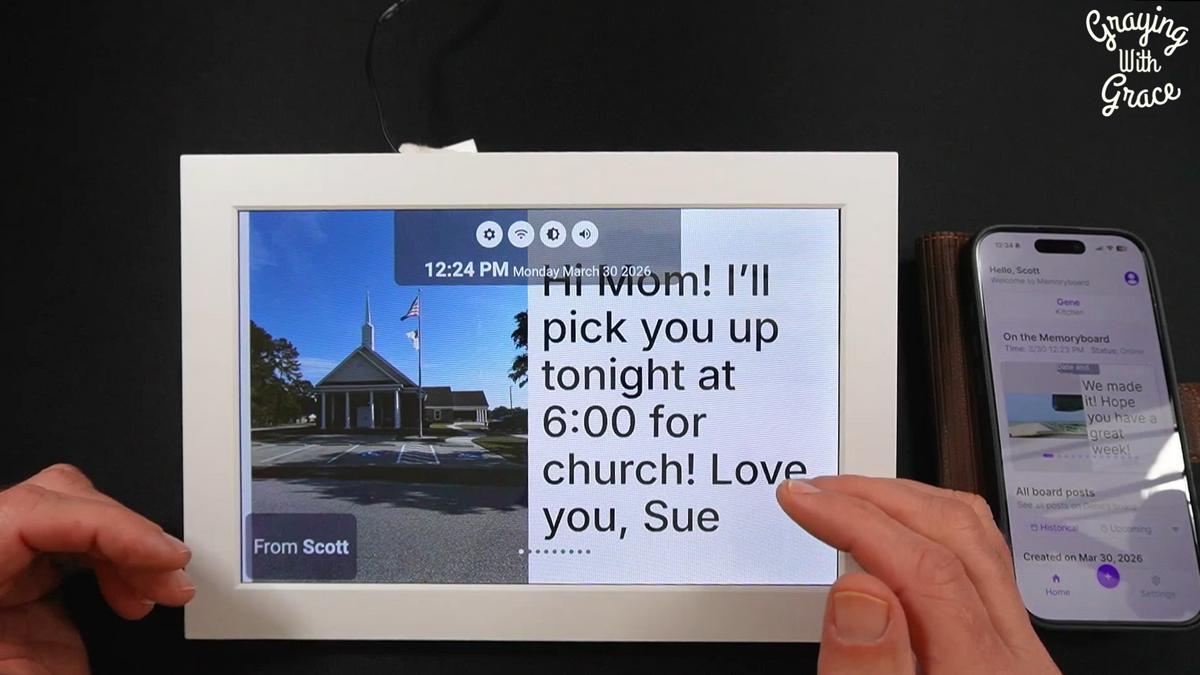
The most important feature of the MemoryBoard Daily Calendar and Reminder System is what it doesn’t require: your loved one doesn’t have to do anything to receive information. The screen updates automatically, and a gentle alert sounds when a new message arrives.
That passive design is a game-changer for older adults with dementia, but it’s equally valuable for seniors with severe hearing loss, limited dexterity from conditions like rheumatoid arthritis, or anyone who has simply lost confidence navigating a phone.
The care circle feature lets an unlimited number of family members participate — each with the ability to post messages and edit each other’s posts. When plans change, everyone sees the updated information. No more three siblings, three different versions of Tuesday’s schedule.
When I evaluated this product, I noticed how thoughtfully the no-subscription model works in favor of families on fixed incomes. It’s a one-time purchase. No monthly fees creeping up on you down the road.
One feature I didn’t fully anticipate until I heard from caregivers: because everyone in the care circle sees the same messages and photos through the app, it functions almost like a private family feed. One caregiver described it as “a mini Facebook that brought everyone closer together” — his 91-year-old mother in a retirement home, and his kids spread across different cities, all connected through the same board.
Real Life Experience
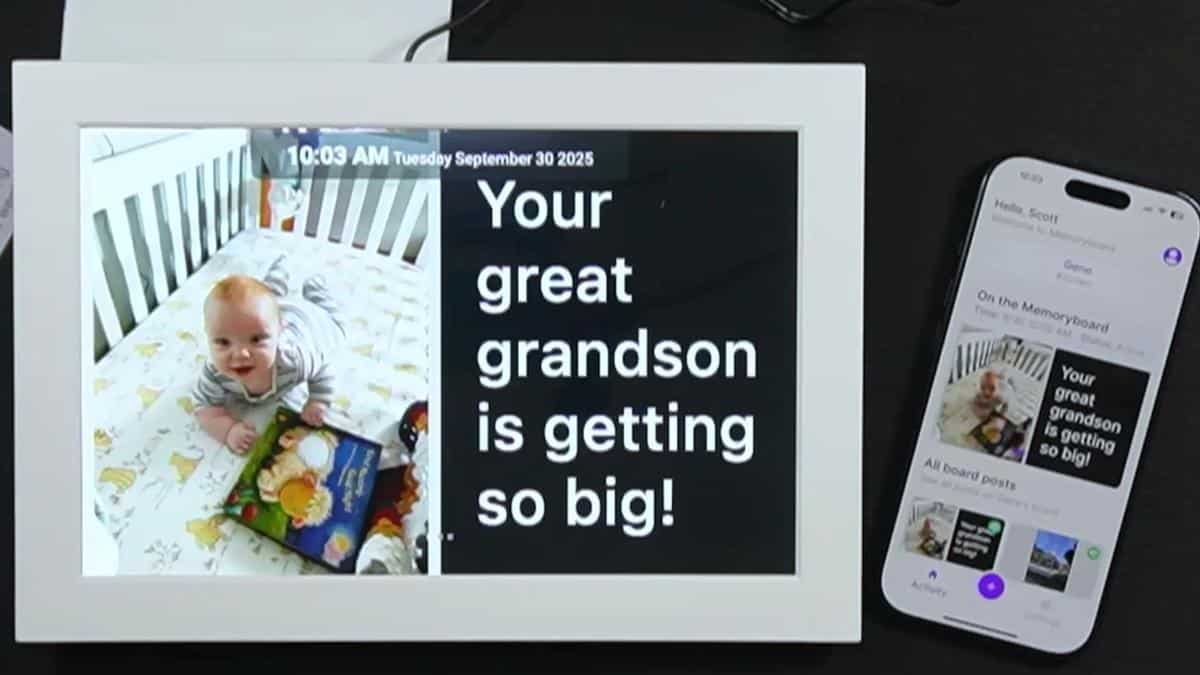
In the video, you can see that the screen itself is calm and readable — not flashy or overwhelming. Messages display clearly, and the alert tone is gentle enough not to startle but noticeable enough to get attention. That balance matters more than you might think for someone who is easily unsettled.
One of the stories that stopped me in my tracks: a caregiver whose mother lives in a memory care facility noticed that her mom often forgot when family had visited — which meant she sometimes felt like nobody had come, even when they had. The board gave the family a way to make sure she always had something visible that told her she was loved. Not a visit record. Just proof that someone was thinking about her today.
Another caregiver described her father as hard of hearing, to the point where phone calls had become so difficult they were counterproductive. The MemoryBoard didn’t supplement their communication — it replaced certain conversations entirely, in the best possible way.
As I demonstrated in the video, family members can send photos directly to the board — not just text reminders. One family sent vacation photos to their mother-in-law throughout the week while traveling. She wasn’t waiting by the phone for a call that might not come. She was watching the trip unfold in real time on her screen.
When I evaluated this product, I noticed that the “upcoming visitor” use case is particularly powerful. One caregiver sent her sister’s arrival time to the board that morning. When the sister showed up, their mom was ready — and even remembered to ask her to pick something up from the store on the way over. She wasn’t a passive recipient of a visit. She was a person with plans.
Maintenance is minimal. The screen stays on and connected as long as it has power and Wi-Fi. There’s nothing to recharge, no filters to replace, no consumables to stock up on.
Will You Be Able to Use It?
For the older adult receiving the messages: if you can look at a screen, you can use this. That’s genuinely the full requirement. No buttons, no typing, no phone navigation.
For the caregiver managing the device: you’ll need a smartphone and basic comfort with apps. If you can send a text message, you can operate this system.
Physical limitations on the receiving end — tremors, limited grip strength, vision loss — are largely irrelevant to using the board itself. The display does the work. Your loved one just needs to be able to see it.
Important Considerations
This is not the right tool for someone with significant vision impairment. Even the 15-inch screen has its limits if your loved one truly cannot read text at a distance.
It also requires a stable Wi-Fi connection in your loved one’s home and a caregiver who is willing to actively manage the app. If the care circle goes quiet, so does the board — and a blank or outdated screen doesn’t serve anyone well.
For older adults in the very late stages of dementia, where awareness of the screen is limited, the impact may be minimal. As I covered in my original video review, there are situations where this isn’t the right fit, and it’s worth thinking honestly about where your loved one is in their journey before purchasing.
Finally, some older adults will push back on something new in their space. That resistance is real and worth respecting. That said, one caregiver I heard from made a deal with her reluctant mother: keep it three days, and if you still hate it, I’ll take it back. The next day, her mother said “I’ll love it.” Resistance doesn’t always last once the board starts working.
Always consult with your doctor or occupational therapist before making health-related product decisions, especially when supporting someone with dementia or a complex medical condition.
Help When You Need It
MemoryBoard offers a 30-day return window, which gives families a meaningful opportunity to try it in a real-life setting without a significant risk. If it genuinely doesn’t work for your situation, you have a clear path back.
Customer support is available through the company, and setup is simple enough that most families won’t need much hand-holding after the initial configuration.
Because it’s a hardware device with no moving parts and no consumables, long-term reliability concerns are relatively low compared to more mechanically complex products.
Understanding the Cost
The MemoryBoard Daily Calendar and Reminder System is a one-time purchase with no ongoing subscription fees. In a market where many tech-for-seniors products layer on monthly charges indefinitely, that’s a meaningful distinction.
When you weigh the cost against the value of reduced caregiver anxiety, fewer disruptive daily phone calls, and a tangible improvement in your loved one’s sense of independence and connection, the math tends to favor it.
If budget is a genuine concern, it’s worth using the discount code GWG10 at checkout for 10% off. (Promo code updated 09/15/2026) That brings the effective cost down to a more accessible level for families managing care on a fixed income.
Making It Work for You
Start simple. Don’t try to program an entire daily schedule on day one. Begin with one or two recurring reminders — morning medication, a daily greeting — and let your loved one get comfortable seeing the board as part of their routine.
Designate one family member as the primary manager of the care circle, at least initially. Too many cooks updating the board at once can create conflicting information, which defeats the purpose. Once everyone understands the system, open it up to the full family.
Use photos early and often. A familiar face showing up on the screen — especially for someone with dementia who may not always recognize voices on the phone — creates emotional connection in a way that text alone can’t match.
If your loved one lives in a memory care facility, check with the staff before setting it up. Most facilities are supportive, but it’s good to coordinate placement and make sure the board is visible from where your loved one spends most of their time.
Our Recommendation
The MemoryBoard Daily Calendar and Reminder System earns a strong recommendation from me — particularly for families caught in the daily phone call loop with a loved one who has dementia, hearing loss, or limited ability to use a phone.
It does something that very few products in this space actually deliver: it improves quality of life for both the older adult and the caregiver simultaneously. Your loved one gets consistent, calm information without the disorienting interruption of a call. You get your mornings back, and that quiet background worry starts to ease.
If your loved one has severe vision impairment, is in the very late stages of dementia, or lacks a stable Wi-Fi connection, this may not be the right fit. There are also situations where in-person support or a medical alert system would be a more urgent first step.
But for the enormous number of families managing daily reminders, long-distance connection, and care coordination across siblings — this is one of the most practical tools I’ve come across in over 20 years of working in this space.
Where to Get It
You can find the MemoryBoard Daily Calendar and Reminder System through the link below, where you can check current availability and choose between the 10-inch and 15-inch versions. Use code GWG10 at checkout to save 10%. (Promo code updated 09/15/2026)
Conclusion
The MemoryBoard isn’t just a reminder screen. It’s a way to give your loved one back a little of what dementia, hearing loss, or physical limitation has taken from them — the feeling that they remember, that they’re prepared, that they’re connected.
And it gives caregivers something equally valuable: permission to put down the phone and trust that the information is there when it’s needed.
If any part of this review sounds like your daily reality, I’d encourage you to give it a serious look. And if you have questions or your own experience with the MemoryBoard, drop them in the comments — I read every one, and so do the other families who find their way to this page.