
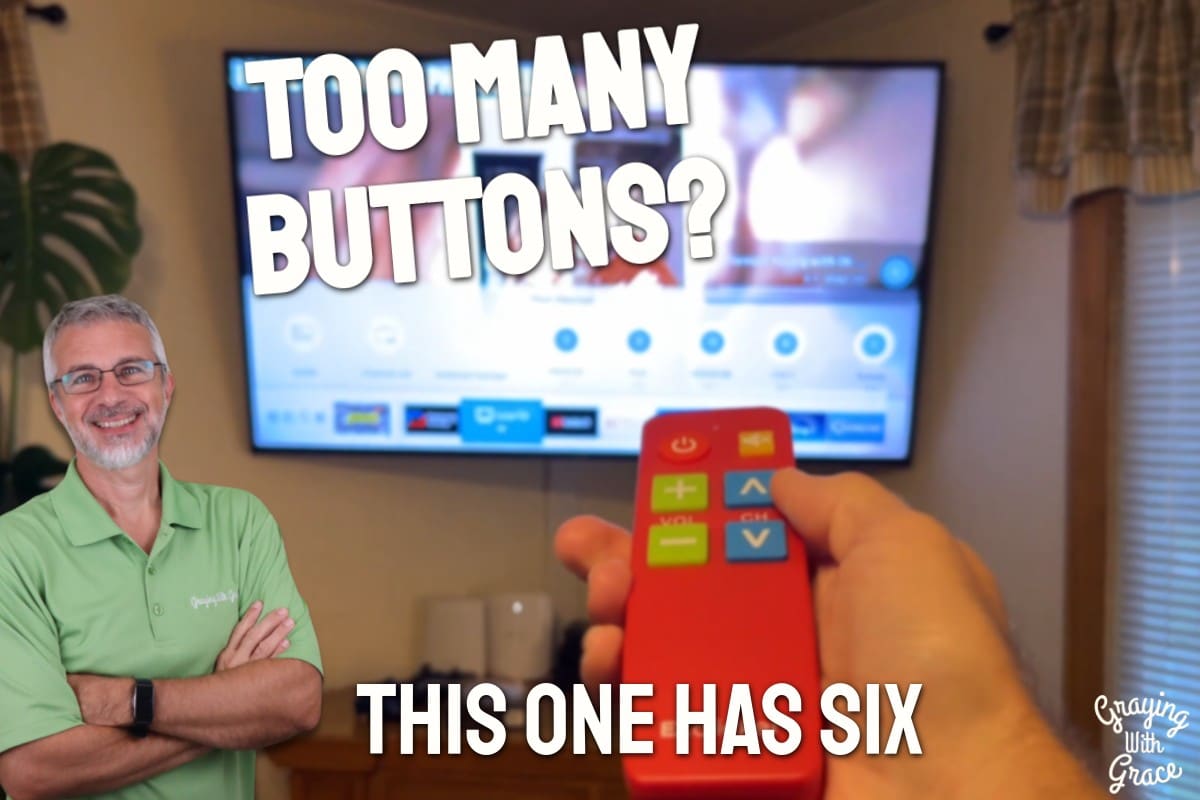
Count the buttons on your current TV remote. Go ahead, I will wait. If you just counted 40, 50, or more buttons and you honestly only ever touch four of them, you are not alone — and you are exactly who the EZclicker Big Button TV Remote was designed for.
Complicated TV remotes are one of the most common daily frustrations I hear about from older adults and their families. Small buttons that are hard to see, layouts that feel like a cockpit control panel, and the dreaded moment when someone accidentally presses something and can no longer get their show back on — it is a real problem with a simple solution.
I am Scott Grant, Certified Senior Advisor (CSA) and Senior Home Safety Specialist (SHSS) at Graying With Grace. I personally evaluated the EZclicker Big Button TV Remote hands-on, and I am going to walk you through everything you need to know to decide if it is the right fit for you or someone you love.


Quick Takeaways
- Problem solved: Eliminates the confusion of complicated remotes with dozens of unused buttons
- Best for: Older adults using basic cable or an antenna who need power, volume, channel, and mute — nothing more
- Worth it? Yes, for the right use case — it is an affordable, practical fix for a daily frustration
- Best feature for seniors: Large, rubberized tactile buttons that are genuinely easy to press and locate by touch
- Biggest limitation: It only controls the TV itself — no streaming devices, cable boxes, or Fire Sticks
Who This Is For
If your mom or dad has called you more than once because they pressed the wrong button and lost their channel — this is for them. The EZclicker Big Button TV Remote replaces their current cluttered remote with something they can confidently use every single day without accidentally triggering a settings menu they cannot escape.
If you are an older adult watching basic cable or using an antenna and arthritis or shaky hands make gripping and pressing a slim, button-covered remote genuinely difficult, this remote was built with you in mind. Six large buttons, a rubberized grippy surface, and a lightweight body make it comfortable to hold and easy to operate.
If you are caring for a loved one with dementia or cognitive difficulties and you want to reduce their frustration around the TV, the bold red version of this remote is a particularly thoughtful choice. Research supports that the color red is more easily perceived by people experiencing cognitive decline, making it easier to locate and identify.
How This Could Help You
Have you ever watched someone you love stare at their TV remote like it is written in a foreign language? That moment of helplessness is exactly what the EZclicker Big Button TV Remote eliminates.
With only six buttons — power, volume up, volume down, channel up, channel down, and mute — there is simply nothing to get confused about. No input button that sends you to a blank screen. No settings menu. No mysterious button that makes everything disappear.
For someone whose hands are affected by arthritis, the large button surface area means you do not have to be precise. As I demonstrated in the video, the buttons take up a good portion of my thumb — they are genuinely large, not just slightly bigger than a standard remote.
Is the mute button important to you? Think about how often the phone rings right in the middle of something good. One large yellow mute button, and that is handled instantly without hunting around a crowded remote.
For adult children shopping to buy an easy remote for their elderly parents, this is one of the clearest and most direct solutions available. You can order it, have it shipped directly to them, and in most cases with major brand TVs like Samsung or LG, it will work the moment they put batteries in — no programming required.
When comparing this to a standard universal remote, the difference is not just button size — it is the entire philosophy. A standard universal remote tries to do everything. This one does exactly what most older adults actually need and nothing else.
Ready to discover more innovative strategies for healthy, comfortable aging? Subscribe to our newsletter for expert-tested tips and product recommendations designed specifically for older adults.
Important Details You Should Know
The remote measures 6 inches long, 2 inches wide, and 1 inch thick — compact without feeling flimsy. When I evaluated this product, I noticed it sits comfortably in the hand without requiring a tight grip, which matters a great deal for anyone with reduced hand strength.
With batteries installed, it weighs just 2.7 ounces — less than three ounces total. That is genuinely light, and most older adults will have no issue holding it for extended periods.
It comes in multiple color options on the product listing. I intentionally chose the red version, and I would recommend it for anyone with cognitive difficulties or vision challenges. That bold color stands out on a couch cushion, a side table, or the floor if it gets knocked off.
The buttons have a rubberized, grippy surface texture. This is not just a cosmetic choice — it means your finger does not slip when pressing, which is a real consideration for anyone with reduced sensation or dexterity.
Getting Started
The box includes the remote itself and a simple, easy-to-follow instruction sheet. You will need to supply two AAA batteries — they are not included, so have them ready before you sit down to set it up.
Battery installation is straightforward: open the panel on the back, drop in the batteries, and replace the cover. When I evaluated this product, I found the cover snapped back into place securely without any fiddling.
For many major TV brands — Samsung, LG, Vizio, Sony — it will work immediately with no programming at all. As I demonstrated in the video, I walked into my living room with a Samsung TV and it worked right out of the box without touching a setting.
If your TV does need to be programmed, the process is simple: turn on your TV with your old remote, then hold down the mute and volume-up buttons on the EZclicker together. The indicator light will start blinking as it cycles through codes. Watch your TV — the moment the volume changes on screen, press the mute button again to lock in that code. That is it.
Features That Matter to You
The single most important feature of the EZclicker Big Button TV Remote is what it does not have. No input button that sends you somewhere you cannot get back from. No settings menu. No smart TV shortcut that opens an app store. Just the functions that actually get used every day.
The tactile feedback on each button is satisfying and clear. When I evaluated this product, I noticed the buttons require very little pressure to register — you do not have to push hard, which is meaningful for hands affected by arthritis or reduced strength.
The large yellow mute button is visually distinct from the other buttons, making it easy to find at a glance — or even by touch alone in a dim room. Small thoughtful details like this make a real difference in daily usability.
For caregivers and family members, the simplified design also reduces the likelihood of “help calls.” When there are only six buttons, there is almost nothing that can go wrong.
Real Life Experience
In the video, you can see that I walked through every aspect of this remote the way a first-time user would encounter it — from installing the batteries to testing whether it worked on my Samsung TV without any programming.
It did. Power on, volume up and down, channel surfing — everything responded immediately. As I demonstrated in the video, I did not have to touch the programming process at all for my Samsung.
The lightweight feel is something you notice right away. At 2.7 ounces, it almost feels like there is nothing in your hand — but in a reassuring way, not a cheap way. The build quality feels solid.
When I evaluated this product, I noticed the red color is genuinely vibrant — not a dull burgundy, but a bright, easy-to-spot red that stands out against most couch fabrics and table surfaces. If it gets knocked to the floor, you will see it.
Battery life is standard for a TV remote at this simplicity level — you can expect good longevity since it is only sending a handful of signals and is not powering any screen or internal processor. Two AAA batteries should last a long time with typical daily use.
Will You Be Able to Use It?
If you can hold a TV remote and press a button, you can use this one. The large buttons require minimal precision and very little force, making them accessible for most levels of dexterity.
For someone with significant tremors or very limited hand mobility, the lightweight design reduces fatigue. It does not require two hands to operate — one hand is enough for all six buttons.
No tech knowledge is required. If your TV is a major brand, there is a strong chance you will never need to follow a single instruction. And if you do need to program it, the steps are genuinely simple — two buttons held together, then one button pressed when you see the TV react.
Important Considerations
This remote does not work with cable boxes, Fire Sticks, Roku devices, or any other streaming hardware. If your loved one’s main TV experience involves navigating a streaming service or a cable guide, this remote alone will not cover those needs.
If the TV is set to a streaming app input when it is turned on, the EZclicker will not be able to switch it back to regular channels. As I noted in the video, you will want to make sure the TV is set to the correct input before switching to this remote as the primary device.
This is also not suitable as a universal replacement for all TV functions. There is no settings access, no input switching, and no smart TV navigation. That is by design — but it is worth understanding before you purchase.
Always consult with your doctor or occupational therapist before making health-related product decisions, particularly if dexterity, vision, or cognitive concerns are a factor in your remote control situation.
Help When You Need It
The EZclicker comes with a printed instruction sheet inside the box that walks through setup clearly and simply. For most users, this will be all the support they need.
For warranty coverage, return policy, and customer support options, refer to the product listing on Amazon and the seller’s current policies, as these can vary and update over time.
Replacement is straightforward given the accessible price point — if a remote is lost or damaged, ordering a replacement is a simple decision without significant financial concern.
Understanding the Cost
The EZclicker Big Button TV Remote sits in a very accessible price range for what it delivers. For the specific problem it solves — eliminating daily frustration with a complicated remote — the value is hard to argue with.
Consider the alternative: repeated phone calls to family members, the stress of accidentally losing a channel, or the ongoing frustration of squinting at tiny buttons. That daily friction has a real cost in quality of life, even if it does not come with a dollar amount.
There are no recurring costs. Two AAA batteries and you are up and running. Long-term, this is one of the more cost-effective fixes available in the senior accessibility product category.
Making It Work for You
Before switching fully to the EZclicker, make sure your TV is set to the correct input — whichever one brings up your regular cable channels or antenna. This ensures that every time the TV powers on, it goes straight to where you want to be.
If you are setting this up for a parent or grandparent remotely, consider shipping it with the batteries already included in a separate bag and a hand-written note with two simple steps: insert batteries, point at TV, press power. That is genuinely all many users will need.
If the person using this remote also watches TV late at night in a dim room, the red color and large raised buttons make it easy to use without turning on a light. The tactile differences between buttons are clear enough to navigate by feel.
Consider placing a small non-slip mat under the remote on a side table to keep it from sliding off. For someone with memory concerns, labeling the table spot with a sticker can also serve as a helpful visual cue for where the remote lives.
Our Recommendation
If the problem is a complicated TV remote with too many buttons, this is a genuinely excellent solution. The EZclicker Big Button TV Remote does exactly what it promises — and nothing more, which is precisely the point.
I recommend it confidently for older adults using basic cable or an antenna, for anyone whose hands make a standard remote difficult to operate, and especially for caregivers looking to reduce tech-related frustration calls from a parent or grandparent.
If the person you are buying for relies on a streaming device, a cable box, or needs to switch inputs regularly, look for a more comprehensive universal remote designed for those functions. This remote is not trying to be that — and that is its greatest strength.
Where to Get It
You can check current pricing and availability for the EZclicker Big Button TV Remote through the link below. Remember to pick up two AAA batteries before it arrives so you are ready to go right out of the box.
Conclusion
Sometimes the best technology is the technology that gets out of the way. The EZclicker delivers exactly that — six buttons, zero confusion, and a daily TV experience that just works.
If a complicated remote has been stealing small moments of peace and independence from you or someone you love, this is a simple, affordable, thoughtful fix worth trying.
Have you dealt with remote control frustration in your own home — or helped a parent through it? I would love to hear your experience in the comments below. And if you have questions about whether this is the right fit for your specific setup, drop them there too. I read every one.




![Older woman cane glasses chain kitchen safety[1]](https://www.grayingwithgrace.com/wp-content/uploads/2026/05/older_woman_cane_glasses_chain_kitchen_safety1-e1778601056307-450x300.jpg)


