Ever notice how your mom or dad says “I don’t need anything” every single gift-giving season, and you’re left staring at another gift card you know will sit in a drawer?
If you’re searching for a digital photo frame with a day clock for seniors, you’re probably picturing something that actually gets used, not something that gets boxed up in the closet with last year’s gadgets.
The problem most families run into is this: many parents start losing track of what day it is, especially after retirement when every day can start to feel like a Saturday, or during the darker winter months when 5 p.m. looks suspiciously like midnight.
At the same time, they often feel cut off from the grandkids’ day-to-day lives because nobody wants to make them download another app or learn another password.
I’m Scott Grant, a Certified Senior Advisor (CSA) and Senior Home Safety Specialist (SHSS) at Graying With Grace, and I spent hands-on time testing this device from both the family member’s side and the board’s side before writing this review.
This video is sponsored by Memoryboard.
In this review, I’ll walk you through exactly what this board does today, how it can grow if your parent’s needs change down the road, and whether it’s worth putting under the tree or in the gift bag this year.


Reader discount: Use code GWG10 at checkout for 10% off at Memoryboard, except on sale prices.
Black Friday, Nov 27 to 30: $40 off the 15.6-inch and 15% off the 10.1-inch when you go through this Memoryboard link, no code needed.
Early access, from Nov 20: sign up on Memoryboard’s early access page and you get the same Black Friday offer.
Quick Takeaways
- Problems it solves: isolation from family photos, difficulty tracking the day and date, the need for gentle reminders without a clinical feel
- Who benefits most: older adults who live alone or far from family, and adult children trying to stay connected without overwhelming their parent with technology
- Worth the investment? Yes, especially since there’s no subscription fee, so the one-time purchase keeps paying off
- Best feature for seniors: the large, full-written-out day clock that requires zero interaction
- Biggest limitation: the clock and photos currently can’t alternate automatically, so you need to schedule photo time windows
Who This Is For
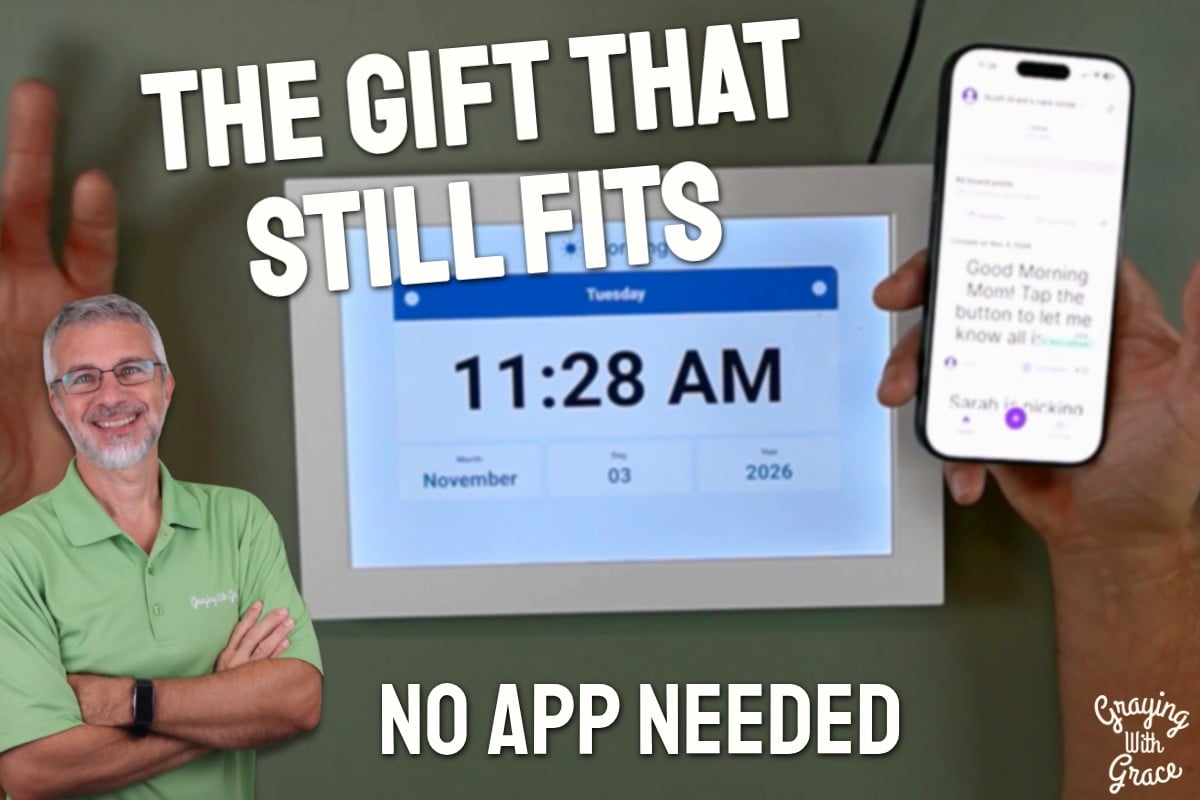
If you’re trying to buy a gift for a grandparent who forgets dates, or who you’ve caught asking “wait, is it Tuesday or Wednesday?” more than once, the Memoryboard gives them a full-screen clock with the day of the week and the entire date spelled out, no abbreviations to squint at.
If you’re an adult child who wants to buy a digital photo frame for a parent but you know they’ll never remember to charge it, check settings, or download anything, this solves that problem directly.
There’s no app, no phone, and no password required on their end. Photos and messages just appear.
If you have grandkids scattered across different states who already take a hundred photos a week and just need somewhere good to send them, the free Care Circle app lets everyone in the family, no matter where they live, contribute photos and short messages to the same board.
How This Could Help You
Think about how isolating it can feel for a grandparent to miss out on the small moments, the soccer goals, the new baby photos, the Tuesday afternoon school project. The Memoryboard closes that gap without requiring your parent to learn a single new skill.
It also tackles a very real daily struggle: knowing what day it is. For an older adult who’s retired and feels like every day blurs together, or who struggles with the dark winter months throwing off their internal clock, having a large, legible clock on the wall or counter is a small comfort that makes a real difference.
Wondering how this compares to a tablet? Unlike a tablet, there’s nothing to charge separately, no apps to accidentally close, and no confusing settings menu for your parent to get lost in. It plugs in and stays on.
And if you’re weighing a photo frame against a medical alert system for an aging parent, it’s important to know this device does not replace one. It’s not an alarm, and it won’t call for help. Think of it as a connection and orientation tool, not a safety device.
Important Details You Should Know
The Memoryboard comes in two sizes: a 10.1-inch version that fits nicely on a kitchen counter or nightstand, and a larger 15.6-inch version better suited to a living room where it’ll typically be viewed from farther away, or for someone who simply wants bigger photos and bigger text.
It needs to stay plugged in at all times, so it is not a portable, battery-powered device you move from room to room throughout the day. Pick its permanent home carefully.
It also requires a 2.4 GHz Wi-Fi connection, which is standard in most homes but worth double-checking if your parent’s router setup is older or unusual.
Getting Started
Setup takes just a few minutes: you plug the board in, connect it to Wi-Fi, and download the free app to your own phone, not your parent’s.
From there, you invite family members into the Care Circle by entering their email address. They receive a link, download the app, accept the invitation, and can immediately start contributing photos.
If you’re buying boards for two sets of grandparents, you can manage both from the same app using the board switcher at the top of the screen, so you don’t need separate accounts or devices to juggle.
My recommendation if you’re giving this as a gift: fill the board and app with pictures before your parent even opens the box, so the moment they turn it on, they immediately see familiar faces and understand the value.
Features That Matter to You
The day clock function is, in my opinion, the standout feature for daily life. It displays the time, the day of the week, the complete written-out date, and even whether it’s morning, afternoon, or evening, all in a large, easy-to-read format.
You can also choose the clock’s color, including purple, blue, green, teal, gold, and light blue, rather than being stuck with a stark black-and-white display like a lot of day clocks on the market.
If your parent’s needs change down the road, the same Memoryboard they’re already comfortable with can add repeating reminders for things like trash night or a standing hair appointment, pinned posts for anything especially important, private messages just between you and them, and read confirmations so you know a message was actually seen.
There’s also a simple daily good-morning check-in feature, which is not an alarm and not a medical alert, but does give you a gentle, non-intrusive way to know your parent is up and moving without having to call first thing every morning. It won’t catch everything, so if you’re worried about falls or health, keep a backup such as a medical alert button or a daily phone call.
Real Life Experience
As I demonstrated in the video, sending a photo is about as easy as texting one straight from your phone’s own photo app. You select your pictures, hit share, choose Memoryboard, and it posts directly to the board, no extra steps or logins required.
When I evaluated this product, I noticed how satisfying the tagging feature is. I labeled photos with the grandkids’ names, Lily and Jack, so that even with a sharp memory, when you’re keeping track of nine grandkids, having names attached to faces never hurts.
In the video, you can see that the clock only displays when nothing else is scheduled on the screen, so I set a photo window from 9:00 a.m. to 11:05 a.m., and the moment that window closed, the board transitioned right back into clock mode on its own, no manual swiping required.
I also tested the read confirmation feature directly, sending a message and watching the “Good morning, Mom” check-in appear, tap, and then disappear from the board once read, confirming receipt back in the app without a single phone call.
I tried out several of the available clock colors myself, and my personal preference ended up being the blue display, which I found showed up clearly even from across the room.
Will You Be Able to Use It?
This is one of the biggest strengths of this product: the person receiving the board doesn’t need any tech skills at all. No phone, no app, no settings, no passwords. Photos and messages simply appear.
The only physical interaction required is an occasional tap on the screen, such as confirming they’ve read a message, which most older adults pick up quickly since it mirrors tapping any touchscreen.
For family members sending content, basic smartphone comfort is helpful, but the process is designed to feel like sending a text message, so even less tech-savvy relatives can usually manage it.
Important Considerations
I want to be clear about what this is not, because I never want you to buy the wrong tool for the job. This is not a medical alert device, it cannot call for help, and your parent cannot text back except by tapping a button to confirm they’ve read a message.
If your dad is hoping to video chat with the grandkids face to face, that’s a different device entirely, and this board won’t fill that need.
It also needs to stay plugged in at all times, so it’s not ideal if your parent moves frequently between rooms or travels often.
And remember, it’s only as good as family participation. If nobody sends photos or messages, it simply becomes a very nice clock, which is fine, but probably not what you were hoping for when you bought it.
Always consult with your doctor or occupational therapist before making health-related product decisions, especially if your parent has significant vision impairment, cognitive decline, or limited dexterity that might affect how they interact with any screen-based device.
Help When You Need It
Memoryboard sells the board on its own store and on Amazon. If you buy from Memoryboard directly, support and warranty questions go straight to them.
If you buy on Amazon, returns may go through Amazon. Either way, I’d reach out to Memoryboard’s customer support team with setup or technical questions, as they’re the best resource for troubleshooting Wi-Fi connectivity or app syncing issues.
Understanding the Cost
One of the features I appreciate most about the Memoryboard is that there’s no subscription fee involved. You purchase it once with no monthly charge, which stands in contrast to many connected devices that quietly add a monthly charge down the road.
Given that it replaces the need for separate purchases (a standalone day clock plus a separate photo-sharing solution) it can actually be a more efficient investment than buying two devices separately.
Making It Work for You
Placement matters more than people expect. Put the board somewhere your parent already looks every day, next to the coffee maker, beside their favorite chair, near the TV, or on the nightstand if the clock function is the main priority.
Keep it at eye level and pay attention to window glare so the screen stays clearly visible throughout the day.
From a home safety standpoint, always plug it in near an existing outlet, and never run the cord across a walkway or in front of a chair. That’s a fall risk waiting to happen, and it’s an easy one to avoid with a little planning.
If you’re also exploring other tools to help your parent track routines, you might find it helpful to read through our guide to the best clocks for seniors for additional orientation options.
Our Recommendation
I think this makes a genuinely good gift, and not just a gadget that gets set aside after the holidays. You buy it once, there’s no ongoing fee, and it gets better every single time someone in the family sends a new photo.
It meets your parent where they are today, whether that’s simply wanting to feel connected to the grandkids, or needing a clearer sense of what day it is, and it’s ready to do more later if things change.
Remember to use code GWG10 for 10% off if you buy directly from Memoryboard’s own store (it doesn’t apply to sale prices). That helps take a little of the sting out of a thoughtful gift.
If your parent is already living with a diagnosed memory condition and needs more robust reminder support today, you may want to start with our deep dive into real-life dementia caregiving uses of this same system.
Where to Get It
You can check current availability and sizing options for the Memoryboard through this link. If you choose Memoryboard’s own store, use the code GWG10 mentioned earlier in this review for 10% off.
Conclusion
At the end of the day, this is one of the rare gifts that genuinely gets used, not because it’s flashy, but because it asks nothing of the person receiving it while giving them something real: connection and a little daily clarity. If you’ve been searching for a thoughtful, low-maintenance gift for a parent or grandparent, I’d encourage you to take a closer look.
Have you tried a digital photo frame with your own parent or grandparent? I’d love to hear how it went, drop a comment or reach out through Graying With Grace, and let’s keep this conversation going.