Your doctor said to keep an eye on your blood pressure at home. So you wrapped the cuff, pressed the button, and scribbled the number on a sticky note that you’ll probably lose before your next appointment. Sound familiar?
That’s the reality for millions of older adults who are monitoring blood pressure at home every day — doing the right thing, but not getting nearly as much value from it as they could. The readings vanish into notebooks, loose papers, or just memory. And if your heart does something irregular between visits, you’d never know.
The RunStar Smart Blood Pressure Monitor was built to fix exactly that problem. As a Certified Senior Advisor (CSA) and Senior Home Safety Specialist (SHSS), I personally tested this device so I could give you an honest, hands-on look at whether it delivers on its promises — especially for older adults.
Here’s what I found.


Quick Takeaways
- Problem it solves: Replaces handwritten logs with automatic, app-based blood pressure tracking that builds real trend charts
- Who benefits most: Older adults managing hypertension, anyone with a heart condition, and caregivers monitoring a loved one remotely
- Worth the investment? Yes — especially if you’re taking daily readings and want something that actually helps you and your doctor spot patterns
- Best feature for seniors: One-button operation with voice readout, plus AFib detection that runs automatically on every single reading
- Biggest limitation: The full experience really does benefit from a smartphone and the RunStar app — it’s less useful as a standalone device
How This Could Help You
Most automatic blood pressure monitors do one thing: give you a number. The RunStar Smart Blood Pressure Monitor does that too — and then keeps going.
Every reading automatically syncs to the RunStar app, where it gets logged, timestamped, and turned into a trend chart over time. Instead of showing up to your doctor’s appointment with a crumpled piece of paper, you can pull out your phone and show them a clean graph of the last three months. That’s the kind of information that can actually change how your care is managed.
Are you one of the estimated 6 million Americans living with AFib — or worried you might be? This monitor screens for atrial fibrillation automatically with every measurement, using a clinically validated algorithm. You don’t press an extra button or activate a special mode. It just happens, every time, quietly in the background.
For caregivers, the remote visibility alone is a game-changer. If you’re helping a parent manage their blood pressure from across town, the app lets you check in on their readings without a phone call. That kind of quiet reassurance is hard to put a value on.
People searching for the most accurate blood pressure monitor or the most reliable blood pressure monitor often wonder whether a home device can really be trusted. The RunStar uses proprietary sensors and algorithms backed by clinical research, and it delivers results in under 60 seconds. In my testing, readings were consistent and felt comparable to what I see in a clinical setting — though I always remind readers that no home monitor replaces a conversation with your doctor.
Always consult with your doctor before making significant changes to how you monitor or manage your blood pressure at home.
Important Details You Should Know
The RunStar is a full upper arm blood pressure monitor — not a wrist device. It’s designed to sit on a table or flat surface while you take your reading, so you’ll need a stable spot near your chair or bed.
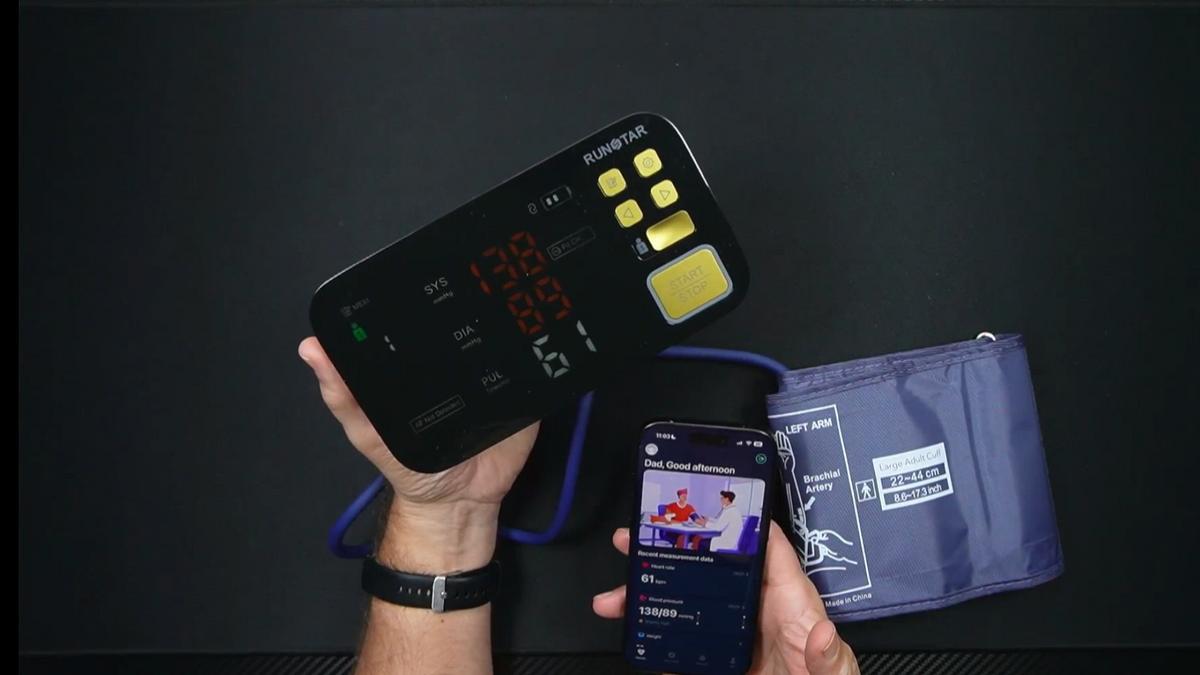
The cuff fits arm circumferences from 8.6 to 17.3 inches, which covers most adult arm sizes. If you’ve struggled to find a blood pressure upper arm monitor with a cuff that actually fits comfortably, this wide range is a real advantage.
The device itself is compact and reasonably lightweight. It won’t take up much counter space, and the USB-C charging cable makes it easy to top off the battery with cords you probably already have around the house.
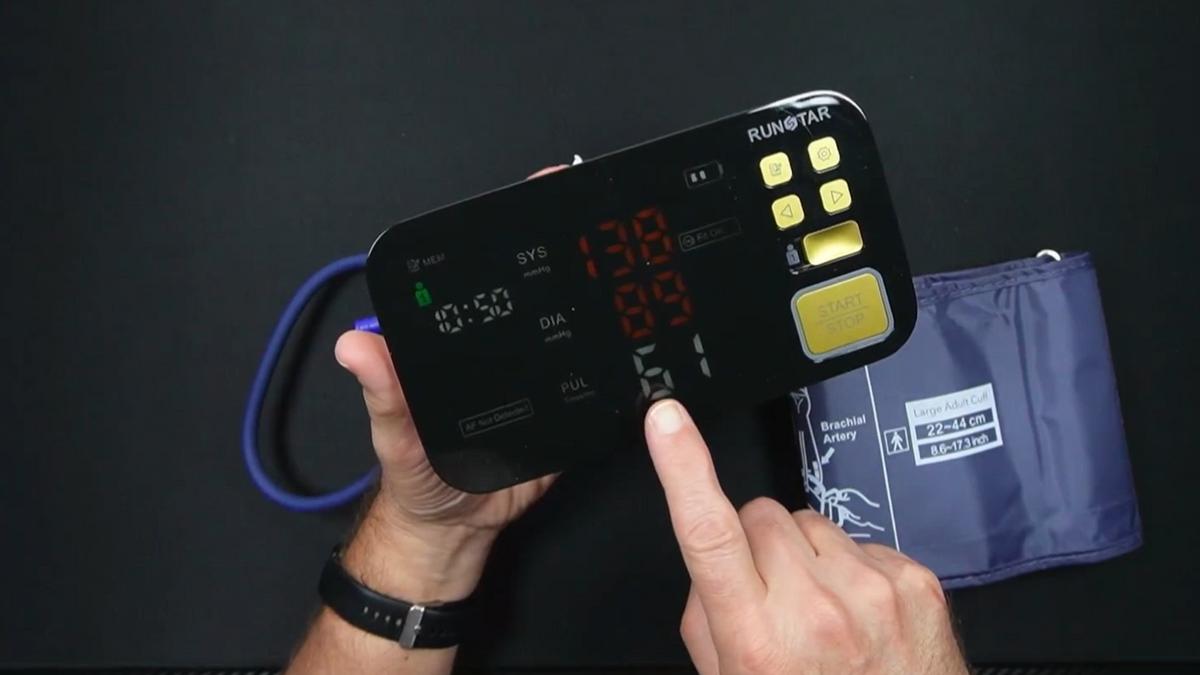
The 6.5-inch LED display is notably larger than most monitors in this category. Unlike standard LCD screens, the high-contrast LED stays readable in low-light conditions — a thoughtful detail for early morning or nighttime readings.
Getting Started
When I evaluated this product out of the box, I was pleased to find both a quick-start guide and a more detailed instruction manual included. The quick-start guide walks you through the basics in plain language, and the full manual covers every indicator light and troubleshooting scenario you might encounter.
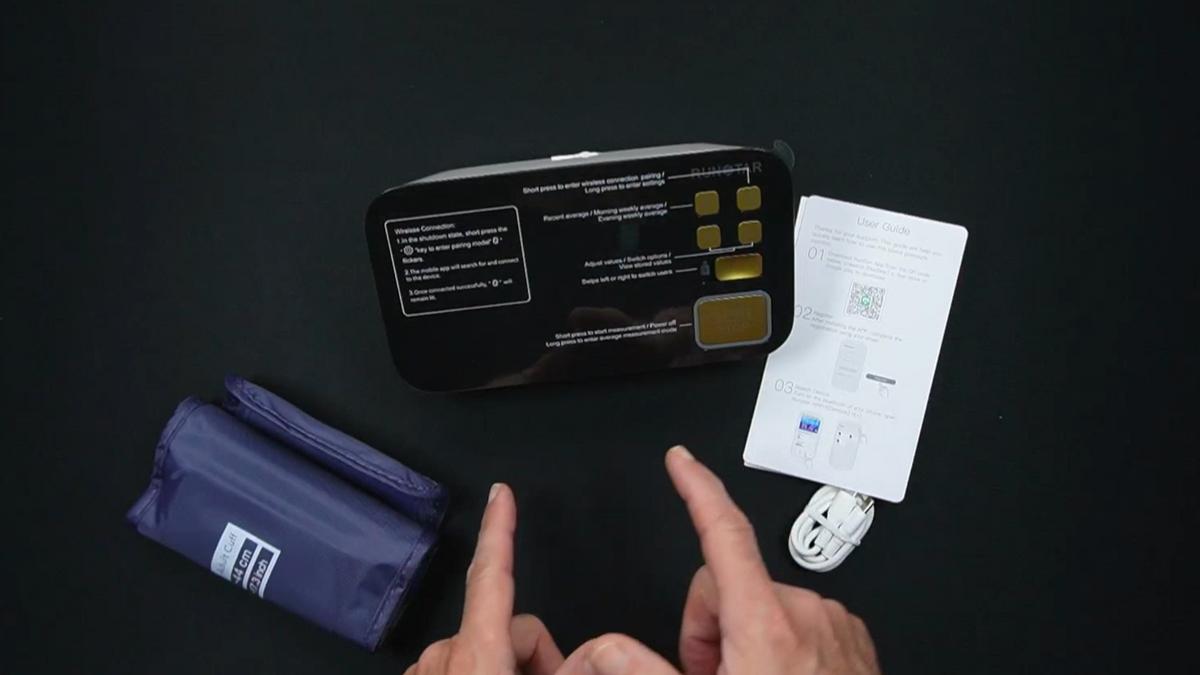
In the box you’ll find the monitor unit, the blood pressure cuff, and a USB-C charging cable. The cuff connects to the unit with color-coded blue connectors — just press them together and you’re ready to go. No guessing which end goes where.
As I demonstrated in the video, setting up the app is straightforward. Search “RunStar” in the App Store or Google Play, look for the green heart with the R icon, and download “RunStar Health and Fitness.” From there, you create an account, enter a nickname and basic health info, and pair the device over Bluetooth with a short press of the settings button.
One thing that genuinely impressed me during setup: once the app connected, it automatically synced the date and time to the monitor. No fumbling through menu settings to get the clock right. That small detail matters a lot for older adults who find manual date entry frustrating.
If you’d rather not use the app at all, you can set everything manually using the settings button on the device itself. The unit has a built-in cheat sheet label on the back describing what each button does — a genuinely thoughtful touch.
Ready to discover more innovative strategies for healthy, comfortable aging? Subscribe to our newsletter for expert-tested tips and product recommendations designed specifically for older adults.
Features That Matter to You
Let’s talk about what actually makes a difference when you’re using this every day.
The voice readout is something I want to highlight specifically. When I took a reading during my evaluation, the RunStar Smart Blood Pressure Monitor announced my numbers out loud — systolic, diastolic, heart rate, and whether the reading was normal or high. No squinting at the screen. No wondering if you read it right. It just tells you.
One-button operation means you press a single button to start a reading. That’s it. For anyone with arthritis, limited dexterity, or just a healthy impatience for complicated gadgets, this is exactly what you want.
The smart cuff detection is one of my favorite safety features. As I demonstrated in the video, when I pressed start without the cuff properly placed on my arm, the device immediately flagged “wrap loose” on screen and in the app. That alert means you’ll never accidentally record an invalid reading without knowing it.
Here’s a feature I haven’t seen handled this simply elsewhere: the dual-user switch. A physical toggle on the device lets you flip between User 1 and User 2 without touching any menus. If you and your spouse both take readings, you just slide the switch. No digging through settings. In the video, you can see that it’s the kind of solution that looks obvious once you see it — and makes you wonder why every monitor doesn’t do it this way.
The AFib detection runs on every single reading, in the background, without any extra steps. When I reviewed my results in the app after testing, it clearly showed the AFib status alongside the blood pressure numbers. If that flag ever comes up during your reading, that’s your cue to call your doctor — not a diagnosis, but a prompt to get checked.
Real Life Experience
When I evaluated this product in a real-use scenario, the reading took well under 60 seconds from pressing the button to seeing the results on screen. The cuff inflated smoothly, the device was quiet during the measurement, and the voice readout kicked in clearly right after the numbers appeared.
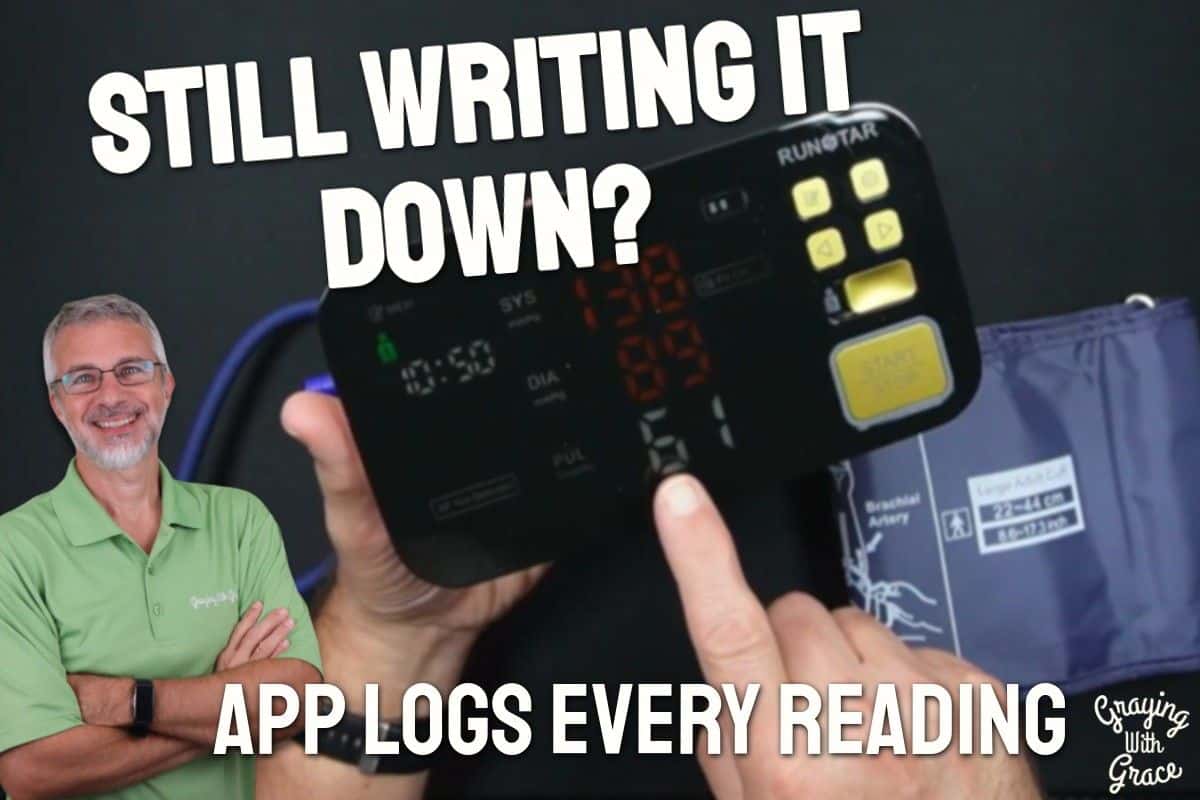
My reading came in at 138 over 89 — a little high, honestly, but I had been moving around quite a bit before filming. I typically run around 130 over 80 to 85, so the elevated number made sense in context. What I appreciated was that the device called it out: “Your blood pressure is high.” No ambiguity. No trying to remember what the ranges mean.
The app experience felt genuinely useful rather than gimmicky. After the reading synced automatically, I could see the numbers, note whether I had taken medication in the last two hours, and rate my stress level. Over time, those contextual notes help your doctor understand what’s driving fluctuations — which is real clinical value, not just a feature on a spec sheet.
Battery life is rated at six months with twice-daily use. That means you’re not hunting for dead batteries or hunting for a charger every few weeks. When it does need charging, the USB-C port is the same standard connector many phones use now, so you likely already have compatible cables.
Day to day, this is a monitor you can just pick up, press one button, and be done in under a minute. The readings go where they need to go automatically. That kind of friction-free routine is what makes people actually stick with daily monitoring instead of letting the habit fade.
Will You Be Able to Use It?
If you can press one button, you can use this monitor. The start and stop function requires no complex sequences, no mode switching, and no reading a tiny screen to confirm settings.
The cuff is designed for one-handed application, which is helpful if you have limited mobility in one hand. The soft, adjustable material wraps around your upper arm and secures without excessive fussing.
For anyone with vision concerns, the 6.5-inch high-contrast LED display and the voice broadcast feature work together as a safety net. Even if you can’t clearly see the numbers, you’ll hear them read aloud in plain English.
Smartphone comfort is helpful but not absolutely required. You can use the device offline, set the time and date manually, and review readings stored directly on the unit (up to 99 per user). That said, you’ll get significantly more value — trend charts, remote sharing, unlimited user profiles — if you pair it with the app.
Important Considerations
This monitor is not a medical device in the clinical sense, and it should not replace regular checkups or professional blood pressure readings. If it flags AFib or a consistently high reading, treat that as a reason to call your doctor — not as a final diagnosis.
If you have very limited technology comfort and no one to help you set up the app, the out-of-box experience is still usable — but you’ll miss the features that make this monitor genuinely stand apart from a basic digital blood pressure monitor.
The monitor requires a table or flat surface to rest on during use. It’s not designed for use while standing or walking. You’ll need a consistent, comfortable spot where you can sit quietly for a minute or two — which is also just good blood pressure measurement practice.
For individuals with severe cognitive impairment, the one-button design is a strength, but app management and trend interpretation would realistically require caregiver involvement.
Help When You Need It
RunStar includes both a quick-start guide and a full instruction manual in the box. The detailed manual covers indicator lights, troubleshooting steps, and settings navigation in plain language.
The RunStar app is available for iOS and Android and includes on-screen guidance during setup. For most users, the pairing process is self-explanatory and takes only a few minutes.
For warranty details, return policy, and customer support options, check the product listing directly — those terms can change, and you’ll want the most current information at time of purchase.
Understanding the Cost
The RunStar Smart Blood Pressure Monitor sits in the mid-to-upper range of the home blood pressure monitor market — higher than a basic no-frills digital blood pressure monitor, but well within the range of what you’d expect to pay for a monitor with AFib detection and app connectivity.
When you factor in the six-month battery life, the elimination of disposable batteries, the FSA and HSA eligibility, and the clinical value of the trend data it generates, the long-term value picture looks quite good.
If you’re already taking daily readings, investing in a monitor that makes those readings actually useful over time is a reasonable decision. A monitor that logs everything, flags irregularities, and gives your doctor meaningful data isn’t just a gadget — it’s a health tool.
Making It Work for You
Take your readings at the same time each day — morning and evening are common recommendations. Sit quietly for five minutes before measuring, keep your arm at heart level, and stay still during the reading. These habits maximize accuracy regardless of which monitor you use.
Use the medication and mood logging fields in the app. It might feel like extra steps at first, but those notes give your doctor meaningful context when they’re reviewing your trend data.
If two people in your household will use the monitor, set up both user profiles in the app from the beginning. That way, readings are attributed correctly from day one and your trend charts stay clean and accurate.
If AFib is ever flagged, don’t panic — but do call your doctor. Screenshot the reading summary in the app before your appointment so you have the exact data ready to share.
Our Recommendation
If you’re looking for a blood pressure monitor for home use that goes beyond just giving you a number, the RunStar is a genuinely strong choice — especially for older adults who want to take their monitoring seriously.
The combination of AFib detection, smart cuff alerts, voice readout, one-button operation, and automatic app logging makes it one of the most well-rounded options I’ve reviewed in this category. The physical dual-user switch is a small design decision that makes a big real-world difference for couples sharing the device.
Where should you look elsewhere? If you have no interest in a smartphone app and want the simplest possible standalone device, a basic automatic blood pressure monitor without connectivity might suit you better. And if you can’t pair the device with a phone, you won’t get trend charts or remote caregiver access — the two features that most distinguish this monitor from the competition.
But if you’re ready to get more out of your daily readings? This one earns a warm recommendation from me.
Where to Get It
You can check current pricing and availability for the RunStar Smart Blood Pressure Monitor using the link below. It is FSA and HSA eligible, so check whether your health spending account covers it before purchasing.
Conclusion
Monitoring your blood pressure at home is one of the most impactful things you can do between doctor visits. But a reading you write on a napkin and lose doesn’t help anyone.
The RunStar turns your daily habit into a health record — one that builds over time, travels with you to appointments, and quietly watches for warning signs you might never notice on your own. That’s a meaningful upgrade from most of what’s out there.
If you have questions about the RunStar or want to share your experience with home blood pressure monitors, drop a comment below. Are you still writing your readings down by hand, or have you made the switch to an app? I’d genuinely love to hear what’s working for you.