

Many people will tell you that they want much less from a smartphone than the typical teenager does. If you live with stiff fingers, changes in your vision, or hearing loss, an ordinary entry-level smartphone can be hard to use. Thankfully, smartphone makers know that more seniors are using smartphones. And, they are trying to help.
Now, many phones have bigger screens plus other features that are aimed to improve their ability to use a mobile phone. However, technical terms like iOS vs Android, Apple vs Samsung vs Nokia, 4.00” screen vs 4.5” screen, etc. can make choosing a smartphone difficult at best.
So, here’s a quick guide on the most popular smartphone choices out there. Plus, I’m going to give you the pros and cons of each. I hope this makes it easier to pick the best smartphone for you or a senior in your life.
Apple iPhones

The iPhone from Apple is probably the most famous of the smartphones available. It also tends to be the most expensive.
Universal Device
So, many of you may be already thinking, “Do I really need an iPhone?” Maybe, if you think of the iPhone as a Universal device. It has a camera, a video recorder, an ebook reader, a web browser, and a pocket-sized computer to check your emails, all rolled into one. So, it becomes so much more than just a phone.
Many iPhones now come with larger screens that make it easier to see family videos. Because you can make the text size larger, you can read an ebook without squinting.
Many of the other high-end smartphones also give you most of these features. But, with an Apple device, things just tend to work a little more smoothly than most others. Also, the iPhone has its own App Store where you can download over a million paid or free apps (third party software) to run on your portable device.
Advantages
- 5.5” Retina HD Display for extremely crisp text and clear images on the screen.
- It is extremely easy to learn and use an iPhone. Most functions are very intuitive.
- The iPhone 7 Plus is water and dust resistant. You can now use your phone near the pool or in the kitchen without worry.
- Excellent built-in accessibility controls that allow you to zoom in the screen and change text size. This makes the screen easier to read for seniors.
- All apps on the iPhone are pre-checked by Apple. So there is very little chance of downloading a virus.
- Extremely powerful camera for stunning still photos and great videos.
- Fingerprint recognition for locking and unlocking your phone without having to remember lengthy passwords.
Disadvantages
- iPhones – even older models – are some of the most expensive phones. If you are only looking to make occasional calls, an iPhone is probably too expensive.
- The newer versions of the iPhones only use wireless headphones. If you prefer to use wired headphones to listen to music or make calls, you will need a special adaptor to connect your wired headphones to the iPhone.
- Transferring data to and from an iPhone is a little bit complicated. The phone has to be synced to iTunes, which controls almost every aspect of file, music and data transfer. Some seniors may find this a tedious or complicated process.
- The internal space of an iPhone cannot be increased with the use of SD cards.
Apple and iPhone are registered trademarks of Apple Inc.
Android Smartphones

Android™ simply refers to a smartphone Operating System (OS) that is made by Google. Android is not associated with any one particular brand of phones. You can find Android software on several brands including Samsung, Google Pixel and Motorola.
Android is updated regularly, and new versions now use numbers instead of the dessert names they once had. Android is a very powerful OS. Each brand adds its own look, so a Samsung phone and a Pixel phone may look a little different, but the basics work the same way.
However, the best thing that Android phones offer, as compared to iPhones, is the ability to customize them. Seniors can set up the screen of their phone just the way they like it. So, they can hide icons they don’t use. It is easy to set up the main screen to only show the most commonly used apps.
Android phones are very powerful and practical smartphones. Many come with features like fingerprint sensors and wireless charging that can make everyday use easier.
Advantages
- Highly customizable system which may allow the elderly to design the look of their phones to suit their personal preference. This is also useful for only adding the apps they will use.
- Android phones are available in all price ranges. So, you can select one that fits your budget.
- Users can run multiple app windows on many popular Android-powered phones. As a result, users can do multiple things, such as watching a video and typing a text message at the same time.
- File sharing, such as photos or music with other Android users, is much easier on any Android phone than on iOS. This is due to using file-sharing apps, as well as Android’s internal file sharing capabilities. This helps family members add music and more to senior’s phones.
- Most new Android phones, from Samsung and other manufacturers, come with a large 5” or more display for easy readability.
- The battery life on popular Samsung and other smartphone brands that use Android are significantly longer than the iPhone.
- All new Samsung phones come with an “Easy Mode“. This setting is a quick way to automatically increase the size of app icons and numbers on the screen and the dial keypad. Easy mode essentially strips the phone to the bare minimum features eliminating all chances of errors. This is a very useful feature for senior users.
Disadvantages
- An Android phone is not as intuitive or as simple to use as the iOS. This may cause the elderly to take some time to learn the Android system.
- Not all apps are available on all phones using an Android OS. Seniors may not find the same app they’re used to on one Android device on their next device.
- Since apps can be downloaded from multiple sources on an Android phone, there is a possibility of downloading a virus.
- Android phones have a soft button to “go back”, unlike the iPhones, which have a single Home Button to go back. The Android soft button can sometimes get lost in apps when they are in full-screen mode, resulting in difficulty getting back to the previous screen.
- With so many models and brands to choose from, it gets confusing trying to pick out an Android phone.
The Android™ name, logo, and other trademarks are the property of Google, Inc.
RELATED: Teaching Grandparents How to Use a Smartphone
The Jitterbug by Lively

The Jitterbug Smart5 is Lively’s newest smartphone for seniors, and Lively calls it its simplest yet. Lively used to be called GreatCall, so you may know the name.
The 6.75-inch screen is large, and real-time call captioning puts the other person’s words on the screen as they talk. The menu is easy to find your way around, so the features you use most are easy to reach.
Lively also offers optional paid health and safety plans. Depending on the plan, these can include phone access to nurses and doctors and an emergency medical alert service that lets you speak to a response agent 24/7. Check what each plan includes before you sign up.
What makes the Jitterbug Smart5 stand out from other phones is its simple menu and the call captions. For many people who want a real smartphone without the clutter, that ease of use is a big plus.

Advantages
- Plans for Jitterbug start very affordable, and there are no contracts or termination policies to worry about
- The Urgent Response button connects you to Lively’s team in an emergency, any time of day
- The Jitterbug phones are made especially for the elderly and are not loaded with unnecessary features that a may confuse the elderly
- Large 6.75-inch screen and real-time call captioning for easier reading and hearing
- 100% US-based customer service and tech support
Disadvantages
- Runs a limited number of apps as compared to iPhone or Android phones
- Works only with Lively phone service, so you can’t take it to another carrier
Jitterbug is a registered trademark and GreatCall is a trademark of GreatCall, Inc.
RAZ Memory Cell Phone
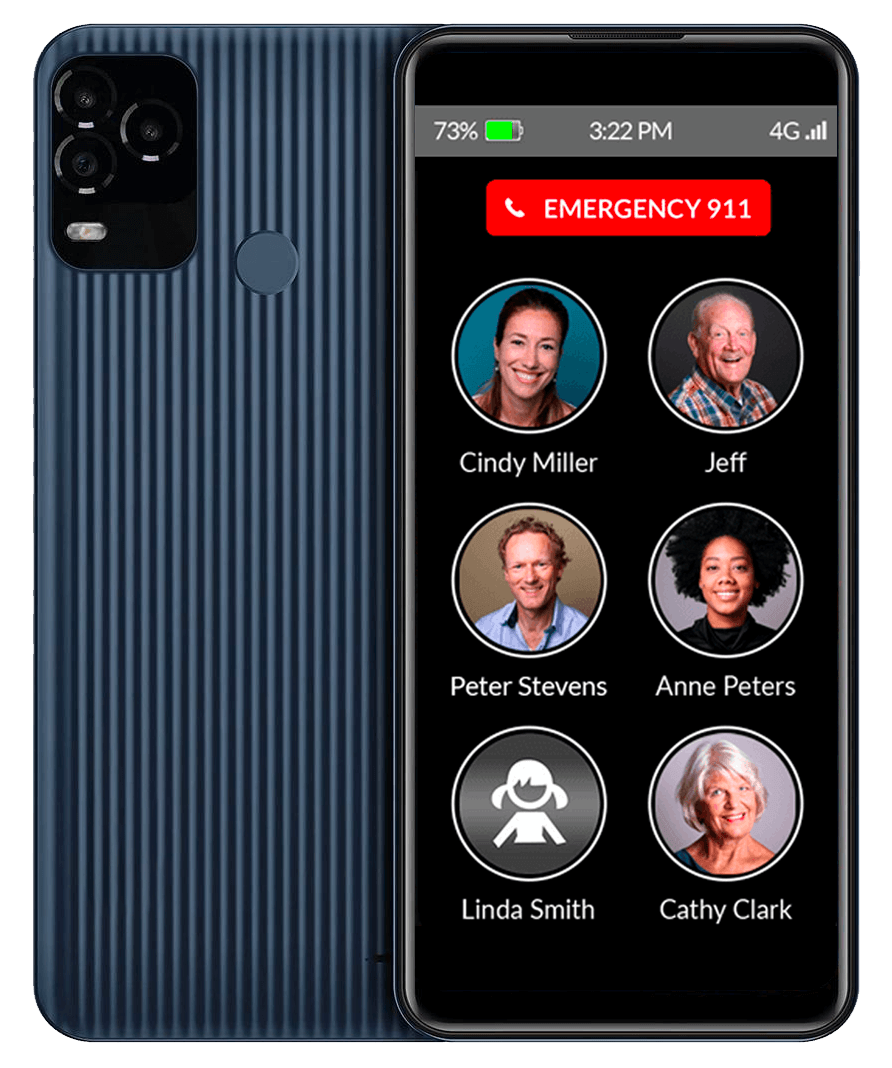
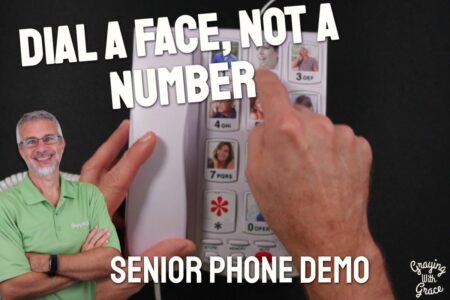
All three phones above can still be too much when someone is living with dementia. For that, I’d look at the RAZ Memory Cell Phone, which hides everything except the people they call.
To place a call, they tap and hold a picture. You set up and change the contacts and settings from your own iPhone or Android, so you can fix things without a visit.
My guide to cell phones for people with dementia has other choices.
Advantages
- Calls start by holding a contact’s picture, and there is no settings menu to get lost in
- You manage contacts, settings and reminders from your own smartphone
- Incoming calls can be limited to contacts and approved numbers, which cuts down on scam and robocalls
- Works with most major carriers, including Verizon, AT&T and T-Mobile
Disadvantages
- No apps or web browser, and the phone does not take pictures
- Group texts and photo messages are not available
- You supply a SIM card with an active data plan, so there is a monthly cost on top of the phone
Final Thoughts
Seniors are becoming more and more tech-friendly today. It is not at all uncommon to see an older adult using a tablet or even a laptop computer every day. Smartphones are common too, because they can make daily life easier in many ways.
Choosing a smartphone can become overwhelming quickly. This is true even for those of us who use them daily. It can be even more confusing when you are picking one for someone else.
RELATED GUIDE: Cell Phones for Seniors With Dementia
Picking a phone is a personal preference. The decision is a combination of meeting your smartphone needs plus finding one you personally like. Blending these two together may not always be easy.
Here are my recommendations:
- If the user is pretty used to using tech and wants the “cool” phone, go with the iPhone. Chances are family members have them and will be able to help if needed. I guarantee their grandkids do!
- For the middle of the road users, an Android is the best choice. You will still have a wide selection of apps to choose from. But, the Easy Mode will help seniors use the phone more easily than an iPhone. It also reduces the chance of the user accidentally messing something up.
- If you want the easiest smart phone for seniors to use, then the Jitterbug Smart wins by a mile. Of course, it is specially designed just for seniors and the elderly.
- If the person has dementia or memory loss and even the Jitterbug would be too much, the RAZ Memory Cell Phone shows only the people they call, and you manage it from your own phone.
Whether you are shopping for yourself or your favorite grandparent, remember that there is a smartphone for every lifestyle need and every budget. Don’t be scared to try out different options or ask around for suggestions.
Remember that almost every smartphone will allow you to do similar things. The difference lies in the ease of which it allows you to do these various things and your personal comfort level with the different types of phones.
Tell me about your experience shopping for a smartphone for seniors. What type did you choose and why? Do you have any specific models you would recommend? Let me know in the comments below! And, if you found this article helpful at all, please share on your socials.




Scott,
Great info. I was wondering if I can get you to help me with a question about iPhone cases.
I have a Jitterbug smart phone, unsure of what case would fit. They give various options, example—iphone 5,6,7 also Galaxy 7,8. Is the jitterbug smartphone equal to any of these other phones,and if so which should I choose?
Thank you for your time
Kathleen
Hi Kathleen – the Jitterbug is unique in its size and other phone cases will not fit it. But, you can get specially made cases for Jitterbugs at Amazon by clicking here (affiliate link). Hope this helps.
I have a government ‘free phone’. I can’t get my Hotmail on this phone even though it is
considered a Smart Phone. Everything is Google!! Thought about an iPhone since I have a
Macbook.
As a senior I am very interested in The Jitterbug Smart phone, I am in Sydney NSW – where or how is this item available and the cost please.? My current Samsung is a bit complicated to use and the finger pads are very small.